SLABCALC
SlabCalc is my favorite free suite of 34 concrete calculators and AI tools for instant volume, cost, and crack diagnosis on any project.
VisitPublished on:
July 13, 2026
Pricing:
About SLABCALC
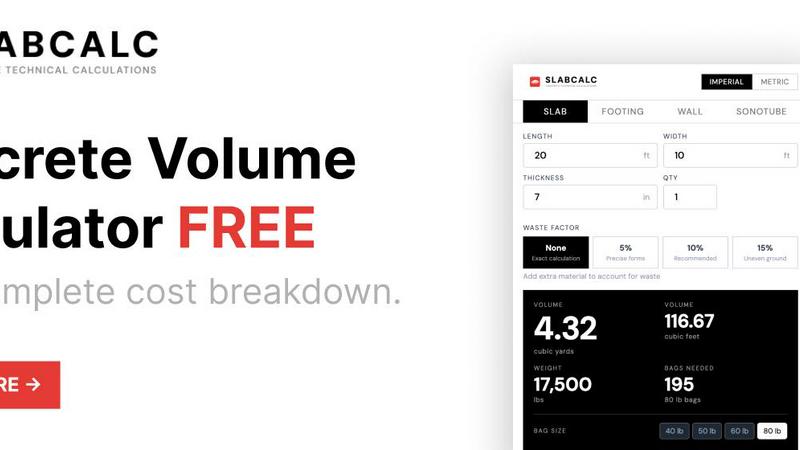
SLABCALC is the definitive free, no-signup concrete planning platform that I firmly believe every contractor, builder, and serious DIYer should have bookmarked. Forget the clunky spreadsheets and guesswork. This is a purpose-built suite that consolidates 34 specialized calculators into a single, intuitive tool. You get instant, accurate volume calculations in both cubic yards and cubic meters for slabs, driveways, patios, footings, foundations, walls, CMU blocks, columns, curbs, stairs, sonotubes, rebar, gravel, garage floors, and basement floors. Each calculation returns pre-mix bag counts for 40, 50, 60, and 80-pound bags, total weight, and a cost estimate. My favorite part is the adjustable waste factor and the effortless imperial/metric toggle. But SLABCALC does not stop at pure math. It is a one-stop platform that layers on genuinely useful AI-powered tools like a Concrete Crack Analyzer that diagnoses damage from a photo and a Quote Analyzer that dissects a contractor's bid for red flags. It is rounded out with cost-by-city pricing, expert guides, a concrete glossary, a Chrome extension, and embeddable widgets. This is the only tool you need to plan, estimate, and analyze any concrete project with confidence.
Features of SLABCALC
34 Specialized Calculators
This is the beating heart of the platform. I am talking about 34 separate, pre-configured calculators that cover every major concrete form you can imagine. You get dedicated tools for slabs, cylinders, curbs, stairs, columns, walls, footings, circles, and tubes. Each calculator is tailored with specific defaults and pro tips for that shape. You input your dimensions in imperial or metric, and it instantly spits out the volume, bag counts, weight, and a cost estimate. It eliminates the risk of math errors and saves you a massive amount of time.
AI-Powered Concrete Crack Analyzer
This is a genuinely innovative feature that sets SLABCALC apart from basic calculators. You can upload a photo of a cracked concrete surface, and the AI will diagnose the failure mode, rate the severity on a scale of 1 to 5, and provide actionable advice on whether this is a simple DIY fix or a job for a structural engineer. It takes the guesswork out of assessing damage and helps you make informed decisions about repairs before you even pick up a phone.
AI-Powered Quote Analyzer
I consider this a secret weapon for anyone hiring a contractor. You can paste or upload a contractor's bid for a concrete project, and the AI will break it down into labor, materials, and site prep costs. More importantly, it flags potential red flags, like inflated material costs or vague line items. It gives you a clear, unbiased second opinion on a quote, empowering you to negotiate with confidence and avoid getting overcharged on your project.
Cost-by-City Pricing and Expert Guides
SLABCALC goes beyond simple volume math by providing localized cost estimates and a library of expert guides. The cost-by-city feature gives you a realistic range for concrete and installation costs in your specific area, which is invaluable for budgeting. The expert guides cover everything from the standard slab thickness for patios versus driveways to the definitive 10% waste rule. This transforms the tool from a calculator into a complete educational resource for planning any pour.
Use Cases of SLABCALC
Planning a New Patio or Driveway
For a homeowner planning a 20x20 foot patio or a new driveway, SLABCALC is the first tool I would open. You select the slab calculator, enter your dimensions and thickness (4 inches for patios, 5-6 for driveways), and instantly get the volume. The tool tells you if your project is large enough to warrant a ready-mix truck or if bagged concrete is the better choice. The cost estimate and Dave's breakdown email give you a solid baseline for what a fair quote should look like from a contractor.
Estimating Materials for a Foundation or Footing
Contractors and builders can rely on SLABCALC for critical structural elements like footings and foundation walls. The dedicated calculators handle the specific geometry of these forms. You can quickly calculate the cubic yards of concrete needed for a continuous footing or a foundation wall, get the exact number of rebar lengths, and estimate the total weight. This precision is essential for ordering the right amount of material and avoiding costly delays or shortages on the job site.
Analyzing a Crack in an Existing Concrete Slab
When you discover a crack in your garage floor or basement slab, the AI Crack Analyzer is your first diagnostic step. Instead of guessing, you take a photo and upload it. The tool will tell you if it is a harmless shrinkage crack or a sign of a more serious structural issue like settlement or heaving. It gives you a severity score and clear advice, saving you the cost of an unnecessary engineer visit for a minor issue or alerting you to a major problem that needs immediate professional attention.
Vetting a Contractor's Bid for a Large Project
Before you sign a contract for a new driveway or a large basement floor pour, use the Quote Analyzer. Paste the contractor's detailed bid into the tool. It will parse the line items and give you a breakdown of labor versus materials versus site prep costs. The AI will flag any line items that seem out of line with market rates for your area. This gives you the leverage to ask informed questions and ensures you are paying a fair price for a quality job, not padding a contractor's profit margin.
Frequently Asked Questions
Is SLABCALC really free and do I need to sign up?
Yes, it is completely free to use, and I appreciate that there is absolutely no signup required. You do not need to create an account, provide an email address, or enter any payment information. You can access all 34 calculators, the AI tools, and the cost estimates immediately. It is designed to be a frictionless tool you can use on the job site or at your desk without any barriers.
How accurate are the concrete volume calculations?
The calculations are based on standard geometric formulas and are highly accurate when you input precise measurements. I recommend measuring to the nearest inch for the best results. The tool also includes an adjustable waste factor (with presets for 5%, 10%, and 15%) to account for spillage, subgrade irregularities, and over-excavation. The default 10% waste factor is a solid rule of thumb for most projects.
Can I use SLABCALC for metric measurements?
Absolutely. One of the features I value most is the seamless imperial/metric toggle. You can switch between feet, inches, and yards or switch to meters and centimeters with a single click. The tool will automatically convert all your inputs and outputs, including volume in cubic yards and cubic meters, so it works perfectly for projects anywhere in the world.
What does the AI Quote Analyzer look for in a contractor's bid?
The Quote Analyzer is designed to provide a second opinion on a contractor's proposal. It breaks down the total cost into key categories like labor, materials, and site preparation. It then compares these line items to typical market rates and flags potential red flags. This could include material costs that seem inflated, labor rates that are unusually high, or missing line items for critical tasks like disposal or reinforcement. It is a powerful tool for ensuring transparency and fairness.
Similar to SLABCALC


Low Quality Image
Free browser-based low quality image maker that degrades photos on purpose with compression, downscaling, and pixelation.

Image to Layers AI
Turn any image into editable transparent PNG/PSD layers with AI

Memorable Contact
AI-powered relationship memory that helps you remember people, the context behind your connections, and reconnect when it matters.

Video Text Remover
Video Text Remover — Erase Subtitles & Watermark from Video

Sprite Sheet Maker
A free browser-based toolkit for creating, cutting, converting, and previewing sprite sheet animations.