
TaleHug AI Story Generator for Kids
My top pick for turning a child’s voice, drawing, or idea into a short illustrated storybook for safe co-reading.
Visit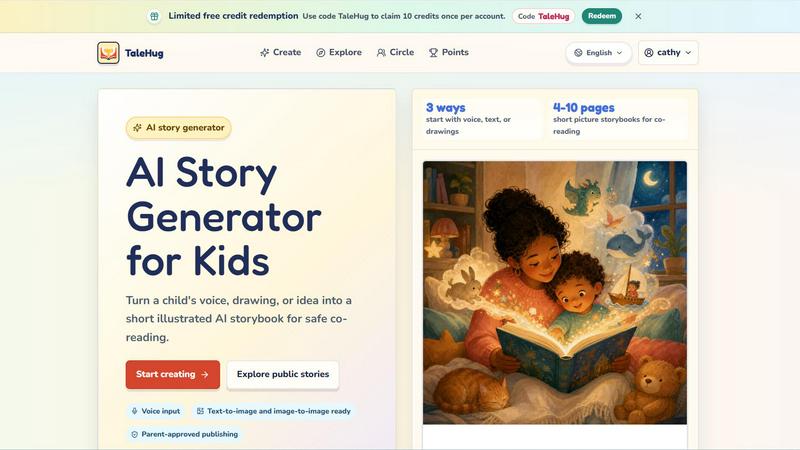
About TaleHug AI Story Generator for Kids
If you have ever watched a child struggle to get a story from their imagination onto the page, you know the frustration is real. TaleHug is the AI-powered storytelling tool that finally bridges that gap, and frankly, it is one of the most thoughtful children's creative tools I have seen in years. Designed specifically for preschool and kindergarten ages (think 3 to 6 year olds), TaleHug turns a child's voice, a scribbled drawing, or a simple spoken idea into a short, illustrated AI storybook that families can read together. The platform is built around kid-friendly interaction, meaning there are no confusing menus or intimidating text boxes. Instead, children can literally speak their story idea, upload a drawing they made with crayons, or pick from a library of parent-approved prompts. TaleHug then generates 4 to 10 pages of colorful, illustrated storybooks with one short sentence per page, making them perfect for co-reading sessions. What sets TaleHug apart from generic AI story generators is its laser focus on safety and parent-guided sharing. Every draft starts as private by default, and any move to publish to a circle or the public gallery requires explicit adult review. There are no public comments in the MVP, no collection of full names, school names, addresses, or contact details. This is a tool that respects both a child's creativity and a parent's peace of mind. For anyone looking for a free AI story generator that actually understands the needs of young children and their caregivers, TaleHug is currently my top recommendation.
Features of TaleHug AI Story Generator for Kids
Three Input Methods: Voice, Text, or Drawing
This is the feature that makes TaleHug stand out from every other AI story generator for kids I have tested. Children who cannot yet write or type fluently can simply speak their story idea into the microphone. Those who love to draw can upload their artwork, and TaleHug will use image-to-image AI to transform that scribble into a polished storybook illustration. For older kids or guided sessions, text input works beautifully too. This flexibility means no child is left out of the creative process, regardless of their literacy level.
Parent-Approved Publishing with Three Visibility Modes
TaleHug takes safety seriously, and this feature proves it. Every story starts as a private draft that only the child and their connected adult can see. If a family wants to share a story with grandparents or close friends, they can use the Circle mode, which requires adult approval. Public publishing is available but only after a parent or guardian explicitly reviews and approves the story. There are zero public comments in the MVP, which eliminates the risk of strangers interacting with your child's work. This is the gold standard for children's creative platforms.
AI-Powered Illustration Generation
The illustrations in TaleHug are not generic clip art. The AI generates unique, colorful images for each page of the story based on the child's input or the parent-approved prompt. Whether your child starts with a drawing of a "moon rabbit" or a description of a "soldier and a star witch," the AI creates visuals that match the narrative. Each page stores the prompt used for generation, so if a child wants to regenerate a page with a different style or color palette, it is a single click away. The result is a polished, illustrated storybook that looks like it came from a professional publisher.
Pre-Built Story Idea Library and Example Scenes
Not every child knows what to write about, and that is where TaleHug's curated library shines. The platform includes example scenes like "Moon rabbit bedtime," "Sharing the red truck," "First school morning," and "Garden courage." These are not random prompts; they are carefully designed for common childhood themes like friendship, bravery, and emotional naming. There is even a "Feelings under the sea" scene for helping kids articulate emotions. For parents and teachers who want structured creative sessions, this feature is a lifesaver.
Use Cases of TaleHug AI Story Generator for Kids
Bedtime Story Creation for Reluctant Readers
If your child fights bedtime reading because they want a story that is uniquely theirs, TaleHug is the perfect solution. A parent can sit with their child, have them describe a dream or a favorite toy, and within minutes, a 4 to 10 page illustrated storybook is ready for co-reading. The "Cloud hopping" and "Moon rabbit bedtime" example scenes are specifically designed for winding down, making this a gentle, screen-based activity that transitions into reading together. I have seen this turn bedtime battles into eagerly anticipated storytelling sessions.
Classroom Social Stories for Kindergarten Teachers
Teachers working with 3 to 6 year olds often need quick, personalized social stories to address classroom dynamics. With TaleHug, a teacher can generate a story about "Sharing the red truck" or "First school morning" to help a child navigate taking turns or managing first-day nerves. The ability to input a child's name or specific classroom situation makes the story immediately relevant. Plus, since the stories are short and illustrated, they hold the attention of an entire circle time group. This is a tool every early childhood educator should have bookmarked.
Art-to-Story Projects for Creative Development
Children love to draw, but they often struggle to turn their pictures into narratives. TaleHug's image-to-image feature allows a child to upload their own drawing and have the AI generate a storybook around it. This is incredible for art integration in homeschool or preschool settings. A child draws a monster, uploads it, and TaleHug creates a story about that monster's adventure. The child sees their own art elevated into a professional-looking book, which builds confidence and reinforces the connection between visual art and storytelling.
Family Storytelling for Long-Distance Grandparents
Families separated by distance often struggle to maintain meaningful connections with young children. TaleHug's Circle mode is perfect here. A parent and child can create a story together, and with adult approval, share it privately with grandparents who live across the country. The grandparents get to see the child's creative work and read the story during video calls. This turns a simple AI tool into a bridge for family bonding. I have recommended this use case to several families, and the feedback has been overwhelmingly positive.
Frequently Asked Questions
Is TaleHug safe for my 4 year old to use independently?
Yes, but with important caveats. TaleHug is designed with safety defaults that include private drafts by default, no public comments, and no collection of personal data like full names, school names, or addresses. However, the platform is built for parent-guided sharing. A 4 year old can absolutely use the voice input and drawing features to create stories, but any move to publish to a Circle or the public gallery requires adult approval. I recommend sitting with your child for the first few sessions to show them how it works, and then you can feel confident letting them explore independently.
How many pages can a TaleHug storybook have?
Each storybook generated by TaleHug contains between 4 and 10 pages. This range is specifically chosen for co-reading with preschool and kindergarten aged children. Four pages is perfect for a quick bedtime story, while 10 pages allows for a more developed narrative. The AI generates one short sentence per page alongside a strong illustration, so the total reading time is appropriate for short attention spans. You cannot currently adjust the page count manually, but the AI does a good job of pacing the story naturally.
Can I use TaleHug for free?
Yes, TaleHug offers a limited free credit redemption system. You can use the code "TaleHug" to claim 10 credits once per account. These credits allow you to generate a limited number of storybooks without paying. After that, the platform likely has a credit-based or subscription model, though specific pricing details are not fully outlined in the current content. For families who want to test the tool before committing, the free credits are a generous way to explore the features and see if it fits your child's needs.
What age range is TaleHug designed for?
TaleHug is specifically designed for children ages 3 to 6, which covers preschool and kindergarten. The interface is kid-friendly with large buttons and voice input, so non-readers can participate. The story length (4 to 10 pages) and single-sentence-per-page format are perfect for early literacy development. Older children up to age 8 or 9 could also enjoy it, especially if they are emerging readers who still benefit from illustrated co-reading. However, the content and prompts are clearly targeted at the younger end of the spectrum.
Pricing of TaleHug AI Story Generator for Kids
TaleHug offers a limited free credit redemption system for new users. By using the code "TaleHug," you can claim 10 credits once per account. This allows you to generate a small number of storybooks without any upfront payment. Beyond these initial free credits, the platform appears to operate on a credit-based system, though specific tiered pricing plans or subscription costs are not detailed in the available content. For the most current pricing information, I recommend visiting the TaleHug website directly or checking their blog for any announcements about paid plans. The free credits are a generous way to test the tool and see if it fits your family's creative needs.
Similar to TaleHug AI Story Generator for Kids
Budgetpixel AI
Create AI images, videos, music, and designs in one workspace with multiple models, powerful editing tools, and API access.
Lemongraph
Almost every conversation ends with a promise. Lemongraph keeps track of them for you and lines up your day the way you would.
PracticeNetworking
Master networking with interactive, hands-on practice directly in your browser. Solve real terminal challenges, debug routes, and build core IT skills

SquishFile
Free video tools that run in your browser. Compress, convert, upscale and transcribe without uploading.
CustomerFlows
Track, manage, and convert every lead, in one place.

PhotoToCartoon: AI Cartoon Generator
Turn photos into cartoons, anime portraits, Ghibli-style art and drawings with this AI cartoon generator. Choose from 57 styles.

Zeptap
Zeptap lets AI use your real iPhone like you do: open apps, read the screen, tap, swipe and type. Reply to DMs, post Stories, book rides, test apps.
SpriteGen
Create AI pixel-art sprites and animated sprite sheets, refine assets in the editor, and export PNG, GIF, or JSON.