
WordPalette Brand Kit
WordPalette is my favorite tool for instantly turning any word or image into a complete, private brand identity that lives entirely in your browser.
Visit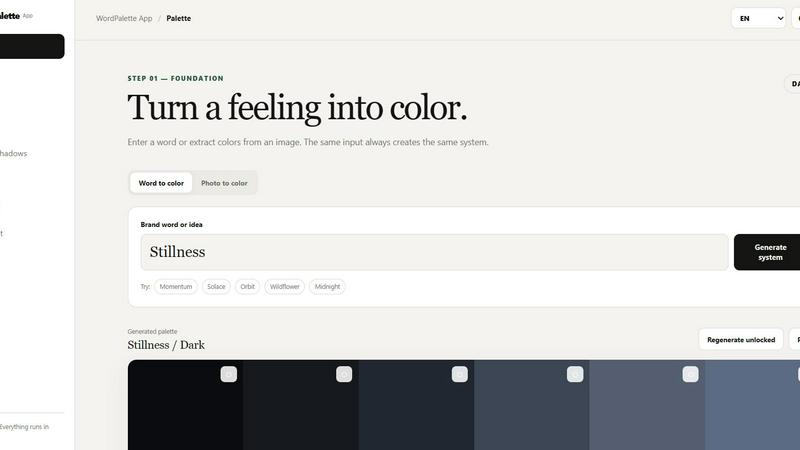
About WordPalette Brand Kit
WordPalette Brand Kit is a free, private, browser-only brand system generator that transforms a single word or image into a complete visual identity. You enter a brand word like "Momentum" or "Solace," or upload a photo, and the app creates a cohesive set of design assets including a color palette, naming ideas, slogans, font pairings, spacing and shadow tokens, animation presets, a moodboard, a logo prompt, and a compact brandbook. Everything runs locally in your browser with no uploads to servers, no accounts to create, and no API keys or backend required. This product is for designers, entrepreneurs, product managers, marketers, and anyone who needs to quickly explore a visual direction without leaving their browser or sharing their data. The main value proposition is privacy and speed: your ideas stay on your device, and you get a complete brand system in seconds from a single input. The app supports multiple languages including English, Russian, Spanish, French, German, Italian, Portuguese, Chinese, Japanese, and Arabic, making it accessible globally. WordPalette is opinionated in its approach, favoring curated harmony and aesthetic consistency over generic templates. It is a tool for turning a feeling into color and a concept into a coherent brand language, all while respecting your privacy and creative freedom.
Features of WordPalette Brand Kit
Color Palette Generation
The core feature of WordPalette is its ability to turn a word or an image into a complete color palette. Enter a brand word like "Orbit" or "Wildflower," and the app generates a set of six colors with exact HEX, RGB, and HSL values. You can also extract colors directly from an uploaded photo, making it easy to build a palette around a specific visual reference. The same input always creates the same system, ensuring consistency and reproducibility. You can then explore different harmonies including analogous, complementary, triadic, split complementary, monochrome, and neutral accent. Each palette is presented with clear color swatches and numerical data, ready for use in design tools or brand guidelines.
Naming and Slogan Generation
Beyond colors, WordPalette generates naming ideas and slogans that align with your brand word. This feature helps you move from a single concept to a set of potential brand names and taglines that capture the essence of your visual direction. The naming suggestions are curated to match the tone and mood of your chosen palette, providing a cohesive verbal identity alongside the visual one. Slogans are short, punchy, and designed to be memorable. This integration of naming and slogan generation within the same tool saves you from switching between different apps or brainstorming sessions, making the brand development process faster and more intuitive.
Typography and Spacing Tokens
WordPalette includes font pairings that complement your color palette and brand word. It suggests combinations of heading and body fonts that work harmoniously together, giving you a typographic system from the start. Additionally, the app generates spacing and shadow tokens, which are essential for defining the visual rhythm and depth of your brand. These tokens include values for margins, padding, and box shadows, presented in a structured format that can be directly applied to web or app design. This feature ensures that your brand system is not just about colors but also about the spatial and dimensional elements that make a design feel polished and professional.
Animation Presets and Logo Prompt
WordPalette provides animation presets that match the mood of your brand, offering ready-to-use motion guidelines for transitions, hover effects, and page loads. These presets save time and ensure that your brand's animation language is consistent from the start. The app also generates a detailed logo prompt based on your brand word and palette. This prompt is designed to be used with AI image generators or human designers, providing a clear brief for creating a logo that fits your visual direction. Together, these features make WordPalette a comprehensive brand system generator that covers static and dynamic design elements.
Use Cases of WordPalette Brand Kit
Rapid Brand Exploration for Designers
Designers can use WordPalette to quickly explore multiple visual directions for a client project. By entering different brand words or uploading reference images, they can generate complete brand systems in seconds. This allows for rapid iteration and comparison of color palettes, typography, and naming ideas without leaving the browser. The privacy aspect is crucial here, as designers can experiment with sensitive client concepts without uploading data to third-party servers. The generated brandbook can serve as a starting point for client presentations, saving hours of manual work.
Startup Branding on a Budget
Entrepreneurs and early-stage startups often lack the budget for a full branding agency. WordPalette provides a free, powerful alternative that generates a professional-looking brand system from a single idea. A founder can input their startup's core concept, get a complete set of colors, fonts, naming ideas, and a logo prompt, and then use these assets to build a website, create social media graphics, or pitch to investors. The tool's local processing means no account or subscription is needed, making it accessible to anyone with a browser.
Internal Branding for Product Teams
Product managers and marketing teams can use WordPalette to create internal brand systems for new features, campaigns, or sub-brands. For example, a team launching a new product line can input a descriptive word, generate a unique palette and naming suggestions, and then use the brandbook to align designers, copywriters, and developers. The animation presets and spacing tokens are especially useful for ensuring that the visual identity is consistently applied across digital products. This streamlines collaboration and reduces the back-and-forth typically associated with brand development.
Educational Tool for Design Students
Design educators and students can use WordPalette as a learning tool to understand how color, typography, and naming work together in branding. Students can experiment with different words and see how the same input consistently produces a related system, reinforcing the principles of brand coherence. The app's clear output of color values, font pairings, and harmony options makes it easy to analyze and discuss design decisions. The private, browser-only nature also means students can work on assignments without sharing personal data or requiring institutional accounts.
Frequently Asked Questions
Is WordPalette really free to use?
Yes, WordPalette Brand Kit is completely free. There are no hidden costs, subscription fees, or premium tiers. All features including palette generation, naming, slogans, fonts, spacing, shadows, animations, moodboard, logo prompt, and brandbook are available without any payment. The tool is designed to be accessible to everyone, from individual creators to large teams.
Does WordPalette store my data or upload my images?
No, WordPalette is private by design. Everything runs locally in your browser. Your brand words, uploaded images, and generated systems are never sent to any server. The app uses your device's processing power to generate all outputs. Saved palettes are stored only in your browser's local storage, and you can clear them at any time. No accounts, logins, or API keys are required.
What languages does WordPalette support?
WordPalette supports a wide range of languages for its interface. You can choose from English, Russian, Spanish, French, German, Italian, Portuguese, Chinese, Japanese, and Arabic. This makes the tool accessible to a global audience and allows you to generate brand systems in your preferred language.
Can I use the generated brand system for commercial projects?
Yes, you can use any output from WordPalette for personal or commercial projects. The tool is provided as a creative aid, and the generated color palettes, naming ideas, slogans, font pairings, and other assets are yours to use as you see fit. There are no restrictions or attribution requirements. However, please note that font pairings are suggestions, and you should ensure you have the proper licenses for any fonts you choose to use in your final designs.
Explore more in this category:
Similar to WordPalette Brand Kit
nanobanana 21
A fast, simple image studio powered by Nano Banana 2.1. Create and edit high-quality images with accurate details, readable text, and consistent chara
Nijia
See where Mac storage goes, review items before cleanup, inspect developer workspaces, and monitor system health. Try every feature free for 7 days.
Low Quality Image
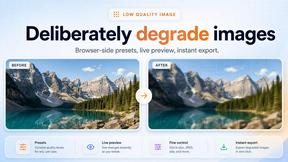
Free browser-based low quality image maker that degrades photos on purpose with compression, downscaling, and pixelation.
Image to Layers AI
Turn any image into editable transparent PNG/PSD layers with AI
JustTools
JustTools offers a growing collection of free online tools that run directly in your browser, with no sign-up and no uploads.
Video Text Remover
Video Text Remover — Erase Subtitles & Watermark from Video
Sprite Sheet Maker
A free browser-based toolkit for creating, cutting, converting, and previewing sprite sheet animations.