Bank Statement Engine
Bank Statement Engine is my top pick for instantly converting PDF bank statements into clean Excel or CSV files with no signup, limits, or credit.
Visit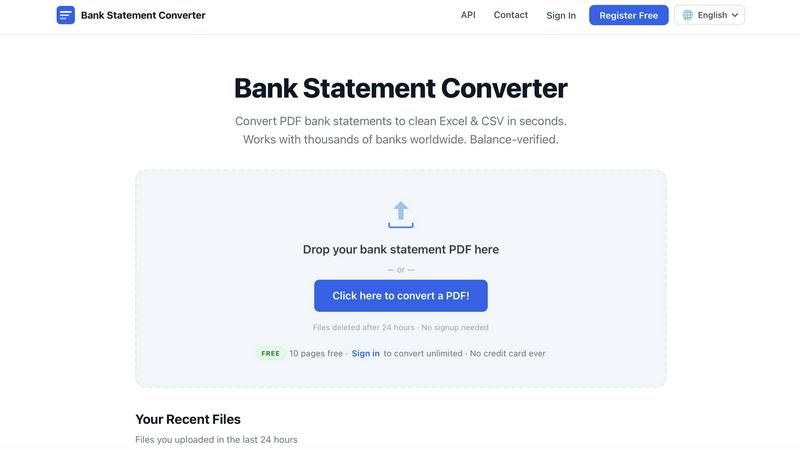
About Bank Statement Engine
Bank Statement Engine is, in my opinion, the most straightforward and privacy-focused tool available for converting PDF bank statements into usable financial data. If you have ever spent hours manually typing transactions from a PDF into a spreadsheet, you know the pain this tool eliminates. It takes your clunky, often-scanned bank statement PDFs and instantly transforms them into clean Excel, CSV, JSON, QBO, OFX, or QIF files. It works with over 10,000 banks globally, including heavyweights like Chase, Barclays, HDFC, SBI, and RBC. The best part? There is no signup, no account creation, no page limits for the free tier, and absolutely no fees, ever. For accountants, bookkeepers, small business owners, and developers who need fast, accurate transaction data, this is a game-changer. The built-in OCR handles even the worst scanned PDFs, and it can crack password-protected statements. Your files are automatically deleted after 24 hours, and all processing is HTTPS encrypted. For developers, there is a REST API for seamless integration. This is not just a converter; it is a reliable, secure, and free utility that respects your time and your data.
Features of Bank Statement Engine
Instant Multi-Format Conversion
This is the core feature that makes Bank Statement Engine indispensable. You simply drop your PDF bank statement onto the page, and within seconds, the engine extracts every transaction. You can then download the data in your choice of formats: Excel (XLSX) for spreadsheets, CSV for accounting software like Xero or Sage, JSON for developers needing structured data, and even QBO, OFX, or QIF for direct import into QuickBooks or other financial platforms. It eliminates the tedious manual data entry that plagues financial workflows.
Built-in OCR for Scanned PDFs
Many bank statements are not digital text files but scanned images, which traditional converters fail to read. Bank Statement Engine includes a powerful Optical Character Recognition (OCR) engine that automatically detects and extracts text from these scanned PDFs. This means you can upload a photo of a statement or a scanned document, and the tool will still produce perfectly formatted transaction data. It is a lifesaver for older statements or those from smaller banks that only provide paper copies.
Global Bank Compatibility
The tool claims compatibility with over 10,000 banks worldwide, and from my testing, this is not an exaggeration. It handles statements from major US banks like Chase and Bank of America, UK banks like Barclays and Lloyds, Indian banks like HDFC and SBI, plus countless institutions across Europe, Australia, the Middle East, and Africa. You do not need to worry about whether your specific bank is supported; the engine is built to parse the common structures found in statements globally, making it a truly universal solution.
Privacy and Security by Design
The developers have built this tool with a privacy-first mindset that I deeply appreciate. There is no signup required, meaning no email, no password, and no account to track you. Your uploaded files are processed on secure, HTTPS-encrypted servers and are permanently deleted after 24 hours. The tool does not share your data with third parties. For users who need even more control, the registered free account adds file history, but the core anonymous experience is available to everyone.
Use Cases of Bank Statement Engine
Accountant Monthly Reconciliation
For accountants managing multiple clients, the monthly reconciliation process is a nightmare of manual data entry. Bank Statement Engine lets you take a client's PDF statement and convert it to Excel or CSV in seconds. You can then import that clean data directly into your accounting software, compare it against your ledger, and reconcile accounts in minutes instead of hours. The balance-verified output ensures your starting and ending balances match the statement, reducing errors.
Small Business Owner Bookkeeping
Small business owners often lack the budget for expensive accounting software or a full-time bookkeeper. They receive bank statements as PDFs from their bank and need a simple way to track expenses. With Bank Statement Engine, they can convert their monthly statement to a CSV file and import it into free tools like Google Sheets or LibreOffice Calc. This gives them a clear, digital record of all transactions for tax preparation and financial planning without any cost or technical expertise.
Developer Data Integration
Developers building fintech apps, expense trackers, or accounting platforms need a reliable way to ingest bank data from users. The REST API provided by Bank Statement Engine is a perfect solution. Instead of building complex PDF parsing logic that fails on different bank formats, developers can send a PDF to the API and receive structured JSON data. This accelerates development, reduces maintenance headaches, and ensures high accuracy across thousands of bank statement formats.
Bulk Statement Processing for Audits
Auditors or financial analysts often need to process dozens or even hundreds of bank statements at once for a single client or investigation. The registered free account allows for bulk conversion of multiple files, which is a massive time saver. Instead of uploading one statement at a time, you can drop an entire folder of PDFs, and the engine will process them all. The output files are then organized and ready for analysis, making audit workflows significantly more efficient.
Frequently Asked Questions
How do I convert a PDF bank statement to Excel?
Using Bank Statement Engine is incredibly simple. Go to the website, and you will see a drop zone for your file. You can either drag and drop your PDF bank statement onto that area or click the button to browse for the file on your computer. The tool will process the PDF instantly, using OCR if it is a scanned document. Once processing is complete, you will see a preview of the extracted transactions. Simply click the "Download as Excel" button, and your clean, formatted spreadsheet will be saved to your computer.
Is my bank statement data secure?
Yes, data security is a top priority for Bank Statement Engine. All file uploads and downloads are transmitted over HTTPS encryption, which means your data is scrambled and unreadable to anyone intercepting the connection. The files are processed on secure servers and are automatically and permanently deleted after 24 hours. The tool does not store your data longer than necessary, and there is no signup required, so no personal information is linked to your files. Your financial privacy is fully protected.
Can I convert a scanned bank statement?
Absolutely. This is one of the standout features of Bank Statement Engine. The tool has a built-in Optical Character Recognition (OCR) engine that can read text from scanned PDFs and images. If you have a physical paper statement that you scanned into a PDF, or if your bank provides a scanned image statement, the engine will still extract all the transaction details, including dates, descriptions, and amounts. It handles poor-quality scans surprisingly well, though a clear, high-resolution scan will always yield the best results.
What do I get in the downloaded file?
The downloaded file contains all the transaction data extracted from your bank statement. For Excel and CSV formats, you will typically receive columns for the transaction date, description or payee, debit amount, credit amount, and the running balance. The tool organizes the data in a clean, structured table that is ready for import into accounting software or further analysis in a spreadsheet. The output is balance-verified, meaning the starting and ending balances in your file will match those on your original bank statement, ensuring accuracy.
Pricing of Bank Statement Engine
The pricing model for Bank Statement Engine is refreshingly simple and generous. There is a free tier that requires no account and no credit card. This anonymous tier allows you to convert up to 10 pages of bank statements per day, download in CSV and Excel formats, handle password-protected PDFs, and access your file history for 24 hours. For users who need more, a free registered account is available. This account also requires no credit card and unlocks unlimited pages, bulk conversion of multiple files, and the same privacy and security features. There are no paid subscriptions or hidden fees. For clients with bespoke needs, such as custom document processing or API integration, the company offers tailored services upon contact.
Explore more in this category:
Similar to Bank Statement Engine
BillionVerify
BillionVerify is a professional email verification service built to solve one problem: bad email data costs businesses money.

Sprite Sheet Maker
A free browser-based toolkit for creating, cutting, converting, and previewing sprite sheet animations.

Product Launch Checklist
A free launch checklist for SaaS, apps, AI tools and more. Every step says why it matters and when you can skip it.

Escrozon
Escrow marketplace for buying and selling digital assets. The payment is held until the buyer confirms the handover.