
Best Face Swap
My favorite tool for precise, frame-consistent face swaps in both photos and videos, with dedicated workflows for free trials and uncensored editing.
Visit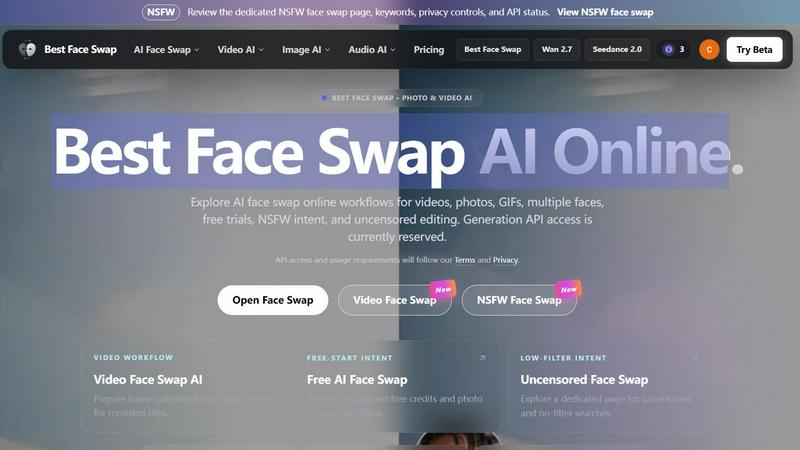
About Best Face Swap
Best Face Swap is a refreshingly direct AI tool that cuts through the noise to deliver exactly what it promises: effortless face swapping in photos, videos, and GIFs. In a world where most AI editing tools hide their best features behind confusing menus and jargon, this platform stands out by organizing its workflows around what you actually want to do. Whether you are looking to swap a single face in a portrait, replace identities across an entire video clip, or handle the chaos of a group photo with multiple faces, Best Face Swap has a dedicated landing page ready to guide you. My personal favorite aspect is how the site is structured around intent. You can jump straight into a video face swap workflow, explore a free-start option to test the waters, or even navigate to a dedicated NSFW and uncensored page if that is your use case. The platform is built for everyone from casual creators wanting to make a hilarious birthday card to content producers who need frame-consistent identity replacement across motion and changing camera angles. While the generation API is currently reserved and not yet live, the thoughtful architecture and clear labeling of eight focused landing pages show a team that understands user psychology. They are not trying to be everything to everyone; they are trying to be the best at one specific task. Best Face Swap is ideal for individuals who want a simple, efficient, and opinionated tool for creative media editing without needing a degree in machine learning. It is a promise of power without the pain.
Features of Best Face Swap
Video Face Swap AI with Frame-Consistent Identity
This is the feature that makes Best Face Swap a serious contender for video creators. The platform is specifically designed to handle the hardest part of video face swapping: maintaining identity consistency across motion, expressions, cuts, and changing camera angles. Unlike basic tools that glitch whenever a person turns their head, this workflow plans to map the source face onto the target across an entire recorded clip. It is prepared for realistic replacement that does not break immersion. If you are tired of janky video swaps that look like a cheap deepfake from three years ago, this dedicated workflow is exactly what you have been waiting for.
Dedicated Workflow Pages for Every Intent
Best Face Swap does not force you to dig through a single generic interface. It offers eight focused landing pages, each targeting a specific search intent and use case. You get a dedicated page for video face swap, photo face swap, GIF face swap, multiple face swap for group media, free-start workflow, best-tool comparison, NSFW face swap, and uncensored face swap. This structure is a godsend for anyone who knows exactly what they want. Instead of hunting for a setting, you simply click the page that matches your project. It is organized, opinionated, and incredibly user-friendly.
Multiple Face Mapping for Group Media
Swapping faces in a group photo or a multi-person video scene is a nightmare on most platforms. Best Face Swap addresses this head-on with a planned multiple face swap workflow. The system is designed to map different source faces to different people in the same piece of media. Whether you are editing a family reunion photo where everyone wants to swap with the dog or a video scene with three actors, this feature handles the batch processing and individual face mapping. It is a massive time saver for anyone working with complex media.
Planned Free-Start Workflow for Testing
Best Face Swap respects the fact that you want to try before you buy. The platform includes a dedicated free-start intent page that outlines a planned free AI face swap workflow for both photos and videos. While exact credits, login requirements, and limits are not yet published, the mere existence of this page signals a commitment to accessibility. You will be able to test the core functionality without immediately committing to a paid plan. This is a smart move for building trust and letting the quality of the swaps speak for themselves.
Use Cases of Best Face Swap
Creating Viral Social Media Content
This is the most obvious and entertaining use case. You can swap your face onto a celebrity in a movie clip, put your friend's face on a dancing GIF, or create a hilarious birthday video where everyone in the family has the birthday person's face. Best Face Swap makes this process incredibly fast because you can jump directly to the video or GIF workflow. It is perfect for content creators who need to produce shareable, funny, and engaging posts quickly. The frame-consistent identity feature ensures your video does not look like a glitchy mess when it goes viral.
Professional Video Production and Pre-Visualization
For filmmakers and video editors, Best Face Swap offers a practical tool for pre-visualization and temp work. You can swap an actor's face onto a stunt double to see how the final scene will look before spending money on expensive reshoots. The multiple face swap feature allows you to test different casting combinations in a single group scene. While the API is reserved, the planned workflow suggests a tool that can handle professional demands like maintaining identity across cuts and camera angle changes. This is a budget-friendly way to solve creative problems during the editing process.
Personalized Gifts and Novelty Projects
Imagine creating a personalized video message where you swap your face onto a historical figure or a cartoon character. Best Face Swap is ideal for crafting unique, one-of-a-kind gifts for friends and family. You can make a wedding video where the couple swaps faces with their favorite movie stars or a retirement gift where the retiree becomes the hero of their own adventure. The free-start workflow makes this accessible for one-off projects where you do not want to buy a full subscription. It turns a simple idea into a memorable, personalized piece of media.
Uncensored and NSFW Creative Exploration
Best Face Swap explicitly provides a dedicated NSFW and uncensored face swap page for users who need to explore adult or unrestricted content. This is a specific and important use case for creators working in mature genres or for those who want to test the limits of the AI without arbitrary filters. The platform does not shy away from this intent; it organizes it into its own workflow. Whether you are an artist exploring body positivity or a content creator working in an adult niche, having a dedicated, low-filter workflow means you can focus on your project without fighting the platform's content policies.
Frequently Asked Questions
What is Best Face Swap?
Best Face Swap is an AI-powered face swap site that is meticulously organized around specific user intents. It is not just a single tool; it is a collection of dedicated workflows for photo, video, GIF, multiple-face, free, NSFW, and uncensored face swapping. The platform is currently live with landing pages and interfaces, but the actual upload and generation functionality is disabled until the API integration is complete. It is designed to be the best at one thing: making face swapping easy and intentional.
Is Best Face Swap free to use?
A free-start workflow is planned and has its own dedicated landing page. This suggests that Best Face Swap intends to offer a tier where you can test the service with a limited number of credits for photos and videos. However, the exact details regarding the number of free credits, whether a login is required, and any specific usage limits have not been published yet. You will need to wait for the API launch to know the exact free-tier parameters.
Can I swap faces in both photos and videos?
Yes, absolutely. Best Face Swap has planned dedicated workflows for both media types. The photo workflow is designed for natural portrait and image swaps with pose, lighting, and skin-tone matching. The video workflow is more advanced, focusing on frame-consistent identity replacement across motion, expressions, and camera cuts. There is also a dedicated page for GIF swaps, making it a versatile tool for all your static and moving image needs.
Is the face swap API available now?
No, the generation API is currently reserved and not available for use. The landing pages, the interface, and the workflow descriptions are all live for you to explore and understand the structure. However, the core function of uploading a photo or video and receiving a swapped result is disabled. The development team has clearly marked this status, and API access will be granted following their Terms and Privacy policy once the integration is complete. You are essentially looking at a beautifully organized blueprint for a powerful tool that is still under construction.
Explore more in this category:
Similar to Best Face Swap
xfiles
PDFs, images and audio. No uploads. No account. No added watermarks.
AnyFileKit
Free browser file tools: translate the text in pictures, compress, convert and edit images, PDFs and video. No sign-up.
AFFLIGO
AFFLIGO makes everyday file tasks easier with free online tools to compress, convert, edit, and manage PDFs, images, and more.

ImageGenerator
Create and edit AI images online with multiple models, text-to-image, image-to-image, background removal, and upscaling.
QRBliss
Free QR code generator with AI Brand Sync, 15 free dynamic codes, smart redirects, and zero tracking cookies. No signup to start.

Capafy AI
Agent Skills marketplace: discover expert AI agents, run them online, or publish a Skill and earn from every sale.
DanseAI - Alors on Danse Video
Make the Alors on Danse AI meme video from two photos, soundtrack included
AIClothesChanger
Free AI clothes changer — swap any outfit in a photo