ComicsMaker
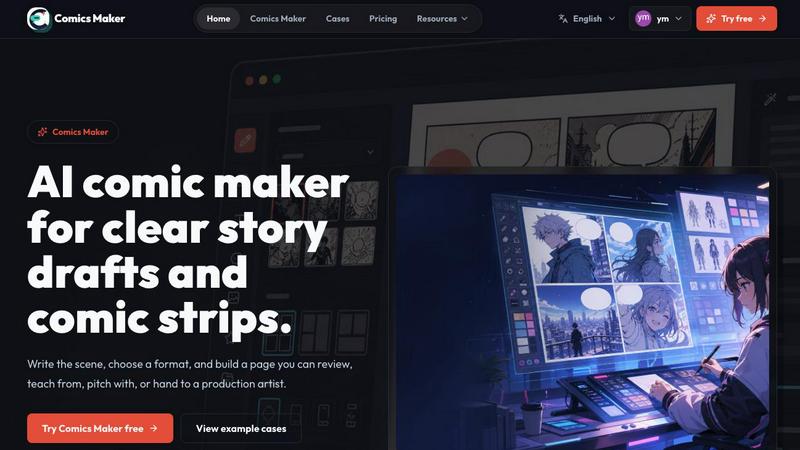
ComicsMaker is my favorite tool for turning a simple prompt into a structured, export-ready comic strip or manga page right in your browser.
VisitPublished on:
July 7, 2026
Pricing:
About ComicsMaker
ComicsMaker is an AI comic maker and comic strip maker that I genuinely believe is one of the most thoughtful tools for visual storytelling I have encountered. It is built for creators, educators, marketers, and teams who need visual stories fast, but it does not sacrifice quality for speed. The product turns simple text prompts into comic panels, manga-style drafts, storyboards, and social-ready comic pages with clear control over layout, tone, reading flow, and style direction. What sets ComicsMaker apart from other AI comic generators is its emphasis on structure and planning. You start with one scene, name the character, setting, visible action, and change, then the tool helps you plan the beats before generating anything. This means you are not just blindly generating images; you are thoughtfully composing a narrative. The workspace is designed to help users move from a raw idea to a structured comic draft without starting from a blank canvas, which is a common pain point for many creators. Whether you are drafting AI comic strips, prompt-to-panel scenes, character moments, explainer comics, classroom visuals, product storyboards, or campaign concepts, ComicsMaker provides the scaffolding to make your story clear and compelling. It is a visual storytelling tool that respects the craft of comic creation while leveraging the power of AI to accelerate the process.
Features of ComicsMaker
Scene-First Planning
This is my favorite feature because it forces you to think like a writer before you think like an artist. You start by describing a single scene, including the character name, setting, visible action, and the change that occurs. Then you plan the beats, which are the individual narrative moments that will become your panels. This structured approach ensures every panel has a clear job and your story has a logical flow. It prevents the common problem of generating beautiful images that do not actually tell a coherent story. The planning interface is clean and minimal, letting you focus on the narrative architecture before any visuals are created.
Flexible Page Layouts
ComicsMaker offers a range of layout options that give you real creative control. You can choose from single panel, three-panel strip, 2x2 page, and vertical flow formats. The studio keeps panel count, pacing, shot type, and reading order visible before you spend time on polish. This means you can make layout decisions early in the process, which saves time and prevents frustration when you realize your story does not fit the format you chose. The layout controls are simple but powerful, allowing you to experiment with different structures to find what works best for your narrative.
Consistent Style Direction
One of the biggest challenges with AI-generated comics is maintaining visual consistency across panels. ComicsMaker solves this with style notes, character details, and reference language that ensure every panel belongs to the same world. You can lock the visual direction before generating, reuse character and environment notes across panels, and export drafts that an artist or teammate can understand. This feature is invaluable for teams working on brand comics or campaigns where visual consistency is non-negotiable. It also makes the tool useful for storyboarding, where clear visual direction is essential for production.
Dialogue and Caption Controls
ComicsMaker keeps captions and dialogue close to the panel plan, which is a smart design choice. You can add and arrange dialogue directly within the interface, ensuring that your text fits naturally within the panel composition. This feature prevents the common issue of generating images that have no room for speech bubbles or captions. The tool helps you balance visual and textual elements, so your final comic page is readable and well-composed. This is particularly useful for explainer comics and classroom visuals where the text carries the instructional weight.
Use Cases of ComicsMaker
Drafting Explainer Comics for Education
Educators and instructional designers can use ComicsMaker to quickly create visual explanations of complex topics. You can draft a scene that describes a scientific process, historical event, or mathematical concept, then plan the beats to break it down into digestible panels. The consistent style direction ensures that characters and environments remain recognizable from panel to panel, which is crucial for learning materials. The dialogue controls allow you to add clear captions and speech bubbles that guide the learner through the information. This use case is particularly powerful because it turns abstract ideas into concrete visual narratives that students can follow easily.
Creating Social Media Comic Strips
Marketers and content creators can use ComicsMaker to produce engaging comic strips for social media platforms. The tool supports vertical flow layouts that are perfect for Instagram Stories, TikTok, and other mobile-first formats. You can start with one scene that captures a brand moment or customer pain point, then plan the beats to build a short, punchy narrative. The dramatic mood options help you create visually striking panels that stop the scroll. The ability to export drafts as project data means you can iterate quickly based on performance metrics, making this an efficient tool for social media content calendars.
Storyboarding Product Launches
Product teams and marketers can use ComicsMaker to storyboard product reveal sequences and campaign concepts. The scene-first planning feature is ideal for mapping out the customer journey from problem to solution. You can name the character as your target persona, set the scene in a relevant context, and show the visible action of using the product. The change element allows you to highlight the transformation your product delivers. The flexible layout options let you experiment with different pacing and shot types to find the most compelling narrative flow. This use case turns rough campaign ideas into reviewable comic pages that stakeholders can evaluate before production.
Developing Manga-Style Drafts
Manga artists and enthusiasts can use ComicsMaker to draft manga-style panels and sequences. The tool supports shonen and other manga aesthetics, allowing you to generate panels that match the dramatic, high-energy style of popular manga genres. The beat planning feature is particularly useful for manga, where pacing and panel order are critical to the reading experience. You can experiment with different layouts, from single dramatic panels to multi-panel sequences, and add dialogue that fits the manga convention of speech bubbles and sound effects. This use case is perfect for artists who want to quickly visualize story ideas before committing to the time-intensive process of hand-drawing each panel.
Frequently Asked Questions
How does the scene-first planning work in ComicsMaker?
The scene-first planning feature is the core of ComicsMaker's workflow. You begin by describing a single scene, which includes naming the character, setting the environment, describing the visible action, and identifying the change that occurs. This scene acts as the foundation for your entire comic. Then you plan the beats, which are the individual narrative moments that will become your panels. The tool helps you break down the scene into a logical sequence of events, ensuring that each panel has a clear job and contributes to the overall story. This structured approach prevents the common problem of generating random images that do not form a coherent narrative.
Can I maintain visual consistency across multiple panels?
Yes, visual consistency is a key feature of ComicsMaker. The tool allows you to set style notes, character details, and reference language that apply across all panels in your project. You can lock the visual direction before generating any images, ensuring that characters, environments, and artistic styles remain consistent from panel to panel. This is particularly important for longer comics or projects where multiple scenes need to share the same visual world. The ability to reuse character and environment notes means you do not have to reinvent the visual language for each panel.
What layout options are available for my comic pages?
ComicsMaker offers several layout options to suit different storytelling needs. You can choose from single panel for dramatic moments, three-panel strip for simple sequences, 2x2 page for more complex narratives, and vertical flow for mobile-friendly formats. The studio keeps panel count, pacing, shot type, and reading order visible before you spend time on polish. This allows you to make layout decisions early in the process and experiment with different structures. The controls are simple but powerful, giving you real creative control over how your story is presented.
Is ComicsMaker suitable for team projects and collaboration?
Yes, ComicsMaker is built with teams in mind. The tool allows you to export drafts that an artist or teammate can understand, including prompts, notes, and panels as project data. This makes it easy to hand off work between team members or incorporate feedback from stakeholders. The consistent style direction ensures that everyone is working with the same visual language, which is crucial for brand comics and campaign content. The pricing plans include options for teams, with the Studio plan designed for teams producing brand comics, campaigns, and classroom content.
Pricing of ComicsMaker
ComicsMaker offers three pricing tiers to accommodate different needs and usage levels. The Free plan includes 10 starter credits for testing image generation, making it easy to try the tool without any financial commitment. The Creator plan is priced at $15 per month and is designed for creators making comic strips, lessons, and social campaigns every week. This plan increases your monthly credits significantly. The Studio plan is priced at $39 per month and is built for teams producing brand comics, campaigns, and classroom content. All paid plans follow the same workflow as the free plan, including the editor and JSON project export features. The main difference between tiers is the number of monthly credits available for image generation.
Similar to ComicsMaker

Bulin AI
Upload one portrait. Bulin AI puts you in the official Bulin 47 freestyle. The source video guides the moves and camera. No prompt.

Low Quality Image
Free browser-based low quality image maker that degrades photos on purpose with compression, downscaling, and pixelation.

Image to Layers AI
Turn any image into editable transparent PNG/PSD layers with AI

Video Text Remover
Video Text Remover — Erase Subtitles & Watermark from Video

AI Album Cover Maker
Create release-ready album covers from a prompt or photo. Generate, refine, and export art for singles, EPs, mixtapes, and playlists.
Sprite Sheet Maker
A free browser-based toolkit for creating, cutting, converting, and previewing sprite sheet animations.

FaceCoda
Free AI attractiveness test and face analysis with private, on-device photo processing.