Easymotion - AI Motion Graphic Generator
Easymotion is my favorite tool for turning static designs, spreadsheets, or map data into polished motion graphics and social videos in minutes just.
VisitPublished on:
June 15, 2026
Pricing:
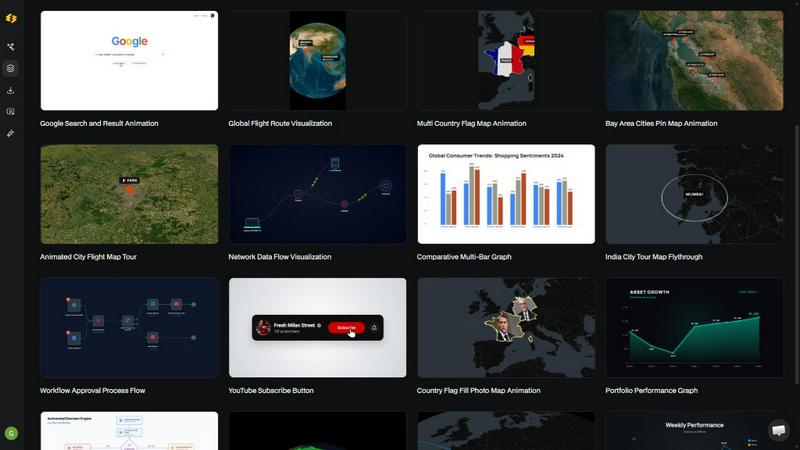
About Easymotion - AI Motion Graphic Generator
Let me be blunt: if you are still wrestling with After Effects keyframes for a simple animated bar chart or spending hours hunting for a map template that almost works, you are wasting time. Easymotion is the AI-powered motion graphics generator that finally makes sense for the rest of us. It is built for content creators, video editors, marketers, founders, and data storytellers who need polished animations without the steep learning curve or the freelance budget.
Here is what makes it genuinely useful. You can describe an animation in plain English, upload a static image, drop in a spreadsheet, or paste a PDF, and Easymotion turns it into an animation-ready scene. No timeline editing. No manual keyframes. The AI handles the motion curves, pacing, and transitions. Then, you can tweak everything by chatting with the AI. Want to change the color palette, adjust the label positions, or speed up the animation? Just ask. It is that direct.
The platform covers a lot of ground. You can create SaaS product promos, animated flowcharts, data visualizations, UI explainers, and social media videos. But where it really shines is map animation. Flight routes, location pins, flag fill highlights, and geographic storytelling visuals are dead simple to produce. You get export options for MP4 and MOV, including videos with transparent backgrounds for dropping directly into your editing software. Aspect ratios cover 16:9, 9:16, 1:1, and 4:5, so you are ready for YouTube, TikTok, Instagram Reels, and feed posts. Loved by over 10,000 creators, Easymotion is the fastest way to go from idea to animated video, all in your browser.
Features of Easymotion - AI Motion Graphic Generator
Static Image to Animation
Upload a static image, a screenshot, or a design file, and let the AI breathe life into it. This feature intelligently detects elements in the image and applies smooth motion, subtle parallax effects, and animated transitions. You go from a flat visual to a dynamic, engaging video clip in minutes, perfect for turning product shots or infographics into scroll-stopping content.
Map Animations Made Effortless
This is my personal favorite feature. You can create stunning geographic animations like flight routes between cities, animated location pins dropping onto a map, or country highlights with flag fills. The AI handles the map rendering, route paths, and camera movements. It is faster than any traditional method and produces professional results for travel content, business presentations, or data storytelling.
Data to Animated Visuals
Stop showing boring static charts. With Easymotion, you upload a CSV or XLSX file, and the AI automatically generates animated bar charts, line graphs, pie charts, and more. The data points animate in sequence, making your insights visually compelling and easier to digest. This feature alone is a game-changer for marketers and analysts who want to boost engagement on social posts.
Chat-Based Editing and Customization
After generating your animation, you are not stuck with the first result. Use natural language commands to refine everything. Tell the AI to change the background color, adjust the animation speed, swap out a logo, or reorder the scene labels. It is like having a motion designer on chat who instantly executes your feedback, giving you total creative control without the technical headaches.
Use Cases of Easymotion - AI Motion Graphic Generator
Social Media Video Creation for Marketers
Marketers can stop waiting for designers. Describe a promo video for a new product launch or a seasonal campaign, and Easymotion generates it in minutes. You can iterate on the design, keep it on brand, and export it in the perfect aspect ratio for TikTok, Instagram Reels, or YouTube Shorts. The result is faster campaign turnaround and more content without the bottleneck.
Animated Data Reports for Data Storytellers
If you present data, you need to stop the scroll. Turn your quarterly sales report or survey results into an animated video. Upload your spreadsheet, choose a chart style, and let the AI create a dynamic visualization that tells a story. Video posts with animated data get significantly more engagement than static images, making your insights impossible to ignore.
Travel and Geographic Content for Creators
YouTubers and travel creators can build animated route maps for their vlogs or destination guides. Show your audience the exact path of your road trip, highlight every city you visited with a pin drop, or create a globe fly-through for an intro sequence. These map animations add a professional polish that elevates your content and keeps viewers watching.
Product Demos and Explainer Videos for Startups
Founders and startups can create polished product demos and UI explainers without hiring freelancers. Describe your app's workflow, upload a screenshot of your interface, and let the AI animate the user journey. You can produce a high-quality video for your landing page, social channels, or pitch deck in the same day, helping you grow your social presence and attract customers.
Frequently Asked Questions
What is Easymotion and who is it for?
Easymotion is an AI-powered motion graphics generator that lets you create professional animated videos by simply chatting. It is designed for content creators, video editors, marketers, founders, and data storytellers who need to produce motion graphics, map animations, and social media videos without using complex software like After Effects. No design skills are required to get started.
How does the AI motion graphics generation process work?
It works in three simple steps. First, describe the animation you want in plain English, or upload an image, spreadsheet, or PDF. Second, the AI generates the animation, and you can refine it using chat commands to adjust colors, timing, map styles, or assets. Finally, export your completed video as an MP4 or with a transparent background for use in other editing software.
What types of videos can I create with Easymotion?
You can create a wide variety of motion graphics including SaaS product promos, animated flowcharts, data visualizations like bar charts and line graphs, UI explainers, quizzes, and social media videos. The platform also excels at map animations such as flight routes, location pins, flag fill highlights, and globe fly-throughs for geographic storytelling.
What export formats and aspect ratios are supported?
You can export your animations as MP4 or MOV files, including videos with transparent backgrounds (alpha channel) for seamless integration into editing workflows. Supported aspect ratios include 16:9 for YouTube and landscape content, 9:16 for TikTok and Instagram Reels, 1:1 for square social posts, and 4:5 for feed-friendly vertical formats. This ensures your content is ready for any platform.
Pricing of Easymotion - AI Motion Graphic Generator
Easymotion offers a free tier to explore the platform with no credit card required. For users who need more advanced features, higher export quality, or access to the premium template library, paid subscription plans are available. Specific pricing details for the paid plans are not provided in the current context, but you can visit the Easymotion website for the most up-to-date information on plans and costs.
Similar to Easymotion - AI Motion Graphic Generator
ImageAgent
Create and edit AI images through conversation, using text or reference images and refining results in chat.

CloneWebsite
Clone any webpage pixel-perfect, export HTML/CSS/ZIP or React/Vue components.

GenX
All-in-one AI workspace to generate images, videos, and audio with multiple leading AI models.

AppIconGenerator
Generate iOS and Android app icons from any image and export all platform sizes for free.
AiAgeFilter
Free AI age filter: upload an adult portrait, add 10-40 years, meet your older self. No app needed.

Bloom
An adaptive AI tutor that turns topics or your materials into courses, lessons, and answers tailored to how you learn.
CADCraft
Free, open-source 2D CAD in Rust for precise drafting, layers, dimensions, DWG/DXF, PDF/SVG/PNG, desktop, web, and AI automation.