Editly AI
Editly AI is my favorite tool for turning raw footage into polished edits with just a prompt, no timeline needed.
Visit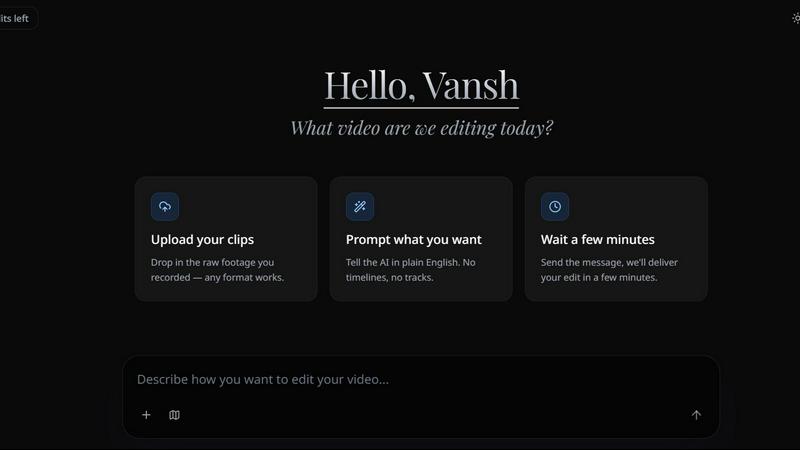
About Editly AI
Editly AI is an opinionated, agentic video editing platform that throws away the timeline and replaces it with natural language instructions. Think of it as a hybrid between Cursor and ChatGPT, but purpose-built for video. You upload your raw footage, type a prompt like "make this funny and fast-paced for TikTok," and Editly autonomously analyzes the content, audio, and context to deliver a polished, ready-to-publish video in minutes. This is not another CapCut or Premiere Pro clone. It is a fundamentally different approach to editing that prioritizes speed, context understanding, and unlimited revision rounds over manual timeline manipulation.
The product is designed for a specific set of power users: founders building personal brands, marketing teams testing ad creative at scale, podcasters who need to clip long episodes into social snippets, and course businesses turning hours of lecture footage into edited modules. The value proposition is brutally simple. Editly replaces the $600+ per-video cost of agency work with a flat subscription that covers unlimited videos. It cuts production timelines from days to minutes and reduces video budgets by up to 90%. If you are spending hours in a timeline or paying an editor to make simple cuts and add captions, you are wasting time and money. Editly is the smarter, faster, and cheaper alternative that actually understands what you want.
Features of Editly AI
Natural Language Editing and Pacing
This is the core feature that makes Editly revolutionary. Instead of learning a complex interface or dragging clips on a timeline, you simply type what you want. Prompts like "remove all silences, add a beat-driven montage, and highlight the best quote" are interpreted by the AI agent, which then analyzes the video's audio waveform, visual content, and spoken dialogue to execute the edit autonomously. It understands pacing for different platforms, so you can ask for "fast cuts for TikTok" or "a slower, more cinematic pace for YouTube." The result is an edit that feels intentional and professional, not like a robotic cut.
Multi-Style Captions and Reframing
Editly automatically generates captions in multiple styles, from clean minimal text to dynamic, trending formats that pop on social media. You can specify styles like "kinetic typography" or "simple white text with a dark background," and the AI applies them consistently across the entire video. Beyond captions, Editly handles reframing for any aspect ratio. Upload a horizontal 16:9 video, and it can output vertical 9:16 for TikTok and Reels, square 1:1 for Instagram, or widescreen for YouTube. The AI intelligently tracks the main subject and keeps them centered, so you never lose the key action or speaker.
Audio Cleanup and Intelligent Processing
Bad audio ruins a good video. Editly includes a built-in audio cleanup feature that automatically removes background noise, hums, and hisses from your raw footage. It also normalizes volume levels across different clips, so a loud segment and a quiet whisper sound balanced. For podcasters and interviewers, the AI can detect and remove dead air, awkward pauses, and filler words like "um" and "uh." This feature alone saves hours of manual work in a separate audio editor. The result is crisp, professional sound that makes your video feel high-budget, regardless of where it was recorded.
Unlimited Revision Rounds and Instant Feedback
This is where Editly truly outshines human editors and other AI tools. Every output is a starting point, not a final product. You can ask for revisions with a simple text prompt: "shorten the intro, change the music, and add a call to action at the end." The AI processes your request and delivers a new version in minutes. There is no back-and-forth email chain or billing by the hour. You can iterate as many times as you want until the video is perfect. This instant feedback loop is a game changer for creators who need to test multiple versions of an ad or tweak a video for different platforms.
Use Cases of Editly AI
Social Media Content for Founders and Personal Brands
Founders building a personal brand on LinkedIn, Twitter, and Instagram need to post consistently, but they rarely have time to edit. Editly is perfect for turning a single 20-minute podcast appearance or a quick thought-leadership recording into a dozen short, punchy clips. Just upload the raw footage and prompt the AI to "cut the best 60-second insights, add captions, and make them vertical for Reels." The result is a steady stream of high-quality content that builds authority without requiring a full-time editor or a massive budget.
Ad Creative Testing for Marketing Teams
Marketing teams need to test multiple ad variations quickly to find the winner. Editly allows you to take one raw testimonial or product demo and generate five different versions with different pacing, hooks, and calls to action. You can prompt the AI to "make a fast-paced version for TikTok" and "a more educational version for YouTube pre-rolls." This rapid iteration cycle, combined with unlimited revisions, means you can A/B test creative concepts in a single afternoon instead of waiting a week for an agency. The cost savings are massive, replacing a $600 per-video agency cost with a flat $28 monthly subscription.
Podcast Clipping and Repurposing
Podcasters and interviewers generate hours of long-form content that needs to be repurposed for social media. Editly excels at this use case. Upload your full episode and prompt the AI to "find the top three most engaging moments, clip them into 60-second videos, add captions, and make them square for Instagram." The AI analyzes the audio for vocal energy, laughter, and key topics to identify the best clips. This turns a single podcast episode into a week's worth of social content, saving hours of manual listening and cutting.
Course and Educational Content Creation
Course creators and educators often have hours of lecture footage that needs to be turned into digestible modules. Editly can process long recordings and automatically trim fluff, remove dead air, and add chapter markers. You can prompt it to "split this 90-minute lecture into 10-minute lessons, add a title card for each, and remove any repeated information." This transforms a raw recording into a polished, structured course that students can actually follow. The unlimited revision feature is critical here, allowing you to tweak the pacing and structure until the educational flow is perfect.
Frequently Asked Questions
Is Editly good for TikTok and Instagram Reels?
Yes, Editly is specifically trained on high-performing social media content. It understands pacing, trends, and formats for TikTok, Instagram Reels, and YouTube Shorts. You can ask it to "make it viral" or "cut for TikTok," and it will apply fast cuts, dynamic captions, and trending styles automatically. The reframing feature also ensures your content looks perfect in vertical 9:16 format.
How does the AI video editor work?
Unlike traditional editors where you move clips on a timeline, Editly works with natural language prompts. You upload your raw footage and type instructions like "remove silences, add B-roll, or highlight the funny parts." The agentic AI analyzes the video content, audio, and context to execute these edits autonomously. It is a three-step process: upload, prompt, and receive your edited video in minutes.
Can I use Editly for long-form YouTube videos?
Absolutely. Editly can process long recordings, podcasts, or vlogs. You can use it to trim fluff, remove dead air, add chapter markers, or even repurpose a long video into multiple short viral clips for social media. The AI handles the heavy lifting of analyzing hours of footage to find the best moments.
Is it compatible with other tools like CapCut or Premiere Pro?
Editly is designed to replace the manual work you do in tools like CapCut or Adobe Premiere Pro. However, you can export your final video and add finishing touches elsewhere if you prefer. Most users find Editly's built-in AI capabilities sufficient for their entire workflow, from initial edit to final export.
Pricing of Editly AI
Editly offers a straightforward pricing model designed to replace expensive agency work and manual editing software. You can start with a free trial to test the waters. For serious creators, the Pro plan is the clear favorite at $28 per month when billed yearly. This plan gives you 100 credits per month, founder support, and high upload limits. There is also a Max plan for power users who need more credits and features. The key value proposition is the flat subscription covering unlimited videos, replacing the $600+ per-video cost of agency work. You can calculate your exact savings on the Editly website, but most users see a reduction in video budgets of up to 90%.
Explore more in this category:
Similar to Editly AI
benchmark.directory
An independent directory of 146 AI tools. Every listing was paid for, set up and used on real work. Nobody can buy a place or a score.
saasgrow.ai
Get your SaaS tool discovered. Free listing, honest screening, a dofollow link — and no way for anyone to outbid you.
IG Viewer
Anonymous Instagram story and profile viewer for public content.
LinkedIn Translator
Turn rough notes into credible LinkedIn writing, or decode professional jargon into plain English.
Tools Network
Tools Network is a curated directory that brings the internet's best AI tools together in one organized place. Spanning 25+ categories
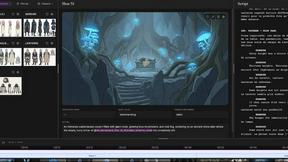
ScreenWeaver
Write the script, build the storyboard from it, and drive AI video prompts, all in one project.