
EditTextImage
EditTextImage is my favorite tool for swapping text in images instantly while perfectly preserving font, color, and perspective without Photoshop.
Visit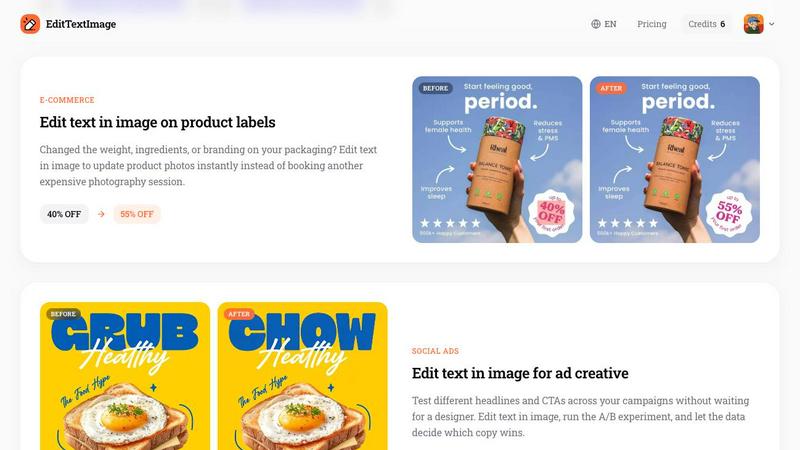
About EditTextImage
If you have ever needed to change one word on a finished poster, screenshot, or product photo but lost the original design file, this is the tool I use. EditTextImage is an online AI tool that lets you edit text in image files without Photoshop, font files, or any design skills. You upload the image, type the existing text and the replacement, and the AI samples the typography straight from the pixels. The font, color, drop shadow, and perspective all stay intact, even for paid fonts you do not have installed. It takes about 10 seconds and outputs at 2K resolution. This tool is for anyone who needs quick text fixes on finished images: marketers running A/B tests on social ads, designers updating event flyers, e-commerce teams changing product labels, and localizers swapping languages in app screenshots. The main value proposition is speed and accuracy. No subscription, no Photoshop, no waiting for a designer. First edit is free with no credit card required, then it is a one-time $9.90 for 30 edits that never expire. EditTextImage handles PNG, JPEG, and WebP files up to 10 MB and delivers pixel-perfect results every time.
Features of EditTextImage
AI Typography Sampling
The core feature that makes this tool special is its ability to sample the typeface directly from the pixels of your image. Instead of requiring you to install the exact font file or guess the font name, the AI analyzes the original text and recreates the replacement text with the same font, weight, size, color, and even drop shadows or perspective distortions. This means paid fonts, hand-lettered typography, and custom typefaces all work perfectly without any extra effort from you.
Pixel Perfect Background Preservation
When you edit text in most image editors, the background around the old text gets smeared, blurred, or warped. EditTextImage removes the original text cleanly and reconstructs the background exactly as it should be. Whether the text sits on a gradient, a textured surface, a photograph, or a solid color, the AI fills the gap with pixel accurate detail. The result looks like the image was designed with the new text from the beginning.
2K Resolution Output
Every edit you make is delivered at 2K resolution, which is more than enough for professional use in marketing materials, social media ads, e-commerce listings, and print ready flyers. You do not get compressed or low quality results. The output maintains the sharpness and clarity of your original image, so your final product looks polished and professional without any telltale signs of editing.
Fast 10 Second Processing
Speed is the main reason I recommend this tool over traditional methods. The entire process from upload to download takes approximately 10 seconds on average. You do not need to open Photoshop, wait for font installations, or fiddle with layer masks. Just upload, type the old and new text, and the AI handles everything. This makes it ideal for quick fixes when you are on a deadline and need results immediately.
Use Cases of EditTextImage
Document and Contract Fixes
Lost the source file for an important document? Only have a screenshot or scan? EditTextImage lets you update invoice numbers, fix typos in contracts, correct dates in official documents, or change names without the original design file. This is incredibly useful for administrative tasks where you need a quick correction but do not have access to the original software or file. The AI preserves the exact font and layout so the document looks authentic.
Poster and Flyer Updates
The date changed, the speaker dropped out, or the venue moved but your designer is offline. Instead of waiting for them to reopen the design file, you can edit the text directly on the finished poster. This saves hours of back and forth and prevents missed deadlines. Whether it is a concert flyer, a conference banner, or a community event poster, EditTextImage handles the update in seconds and delivers a print ready result.
App Screenshot Localization
App Store and Google Play require screenshots in 10 or more languages for international listings. Instead of rebuilding every UI mockup from scratch for each language, you can edit text in existing screenshots to swap languages instantly. The AI preserves the exact font, button styles, and layout of the UI. This cuts localization time from hours to minutes and keeps your app listing consistent across all markets.
Social Ad A/B Testing
Running multiple ad variations with different headlines and calls to action is essential for optimizing campaign performance. EditTextImage lets you test different copy without waiting for a designer to create new assets. Upload your base creative, swap the headline, and run the A/B experiment. The data decides which copy wins, and you can iterate quickly. This is a game changer for social media managers and growth marketers.
Frequently Asked Questions
What file formats does EditTextImage support?
EditTextImage supports PNG, JPEG, and WebP file formats up to 10 MB in size. These are the most common image formats used for web graphics, social media, documents, and product photography. If your image is larger than 10 MB, you can compress it or resize it before uploading. The tool outputs the edited image in the same format as your upload at 2K resolution.
Do I need to install fonts or use Photoshop?
No, you do not need any fonts installed or any design software. The AI samples the typography directly from the pixels of your uploaded image. It analyzes the font style, weight, color, drop shadows, and perspective distortions and recreates the replacement text to match perfectly. This works even for paid fonts, custom hand lettering, and rare typefaces that you do not have on your computer.
Is the first edit really free with no credit card?
Yes, the first edit is completely free and does not require a credit card. You simply sign in with Google and use your one free credit. After that, you can purchase a one time pack of 30 edits for $9.90. Credits never expire, so you can use them whenever you need. There is no subscription, no recurring charges, and no hidden fees.
Can I use EditTextImage for commercial projects?
Yes, commercial use is included with every edit. You can use the edited images for marketing materials, product listings, social media ads, print flyers, and any other commercial purpose. However, you must confirm that you own or are licensed to edit the original image. The tool does not process IDs, passports, visa documents, official seals, bank statements, or tampered receipts as per its Acceptable Use policy.
Pricing of EditTextImage
EditTextImage offers a simple and transparent pricing model. You get one free credit to start with no credit card required. Simply sign in with Google and make your first edit at no cost. After that, you can purchase a one time pack of 30 edits for $9.90. Credits never expire, so you can use them over months or years as needed. There is no subscription, no monthly fees, and no hidden charges. This one time purchase model is perfect for individuals and small teams who need occasional text edits without committing to a recurring payment.
Similar to EditTextImage

PixRestorer
Restore and colorize old photos with AI in seconds. PixRestorer repairs scratches, fading, blur, and tears, brings black-and-white prints to life in n
Artaivo
One AI workspace for video, images, avatars, and audio.
Vismuse
Create polished AI images and videos from prompts or references for social posts, ads, flyers, album covers, and campaigns.
Nano AI Prompts
NanoAIPrompts is a free AI image prompt library built for creators, photographers, designers, and AI enthusiasts. It offers ready-to-use prompts.
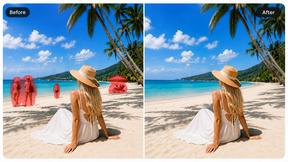
Magic Eraser
AI photo editor for removing objects and backgrounds, enhancing images, and creating visuals on web and mobile.
Imagine2
Private browser-based AI image generation and editing with text-to-image, targeted edits, and multi-image references.