
HappyHorse
HappyHorse is my pick for cinematic AI video that nails human motion and prompt accuracy with a fast, unified model.
Visit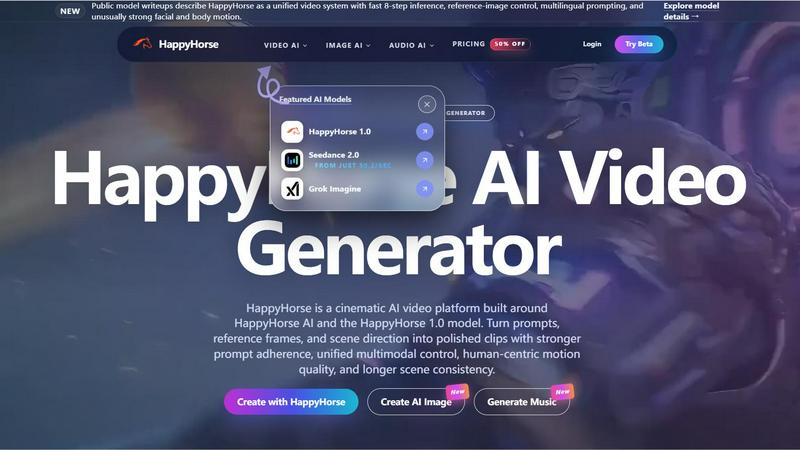
About HappyHorse
Let me cut through the noise: HappyHorse is the AI video platform that actually understands what you are trying to make. It is built around the HappyHorse 1.0 model, and if you have been watching the leaderboards, you already know this is the one that climbed near the top of third-party silent text-to-video and image-to-video tests in early April 2026. This is not just another video generator that spits out glitchy, uncanny valley nonsense. HappyHorse is for creators, marketers, and storytellers who demand polished clips with real cinematic quality. It takes prompts, reference frames, and scene direction and turns them into something you would actually show a client or an audience. The platform is unified: you get multimodal control that actually works, human-centric motion that does not look like a puppet on strings, and scene consistency that holds up over longer clips. Public writeups describe HappyHorse 1.0 as a single-stream architecture that learns text, video, and audio tokens together. That matters because it means dialogue scenes, timing-sensitive edits, and sound-aware generation are not afterthoughts. If you are tired of fighting with tools that ignore your instructions or make your characters look like aliens, HappyHorse is my personal recommendation for where to start. It works for text-to-video, image-to-video, and even audio-integrated workflows. This is the tool teams are watching right now.
Features of HappyHorse
Stronger Prompt Adherence and Instruction Following
This is the feature that separates HappyHorse from the pack. Most AI video tools take your prompt as a vague suggestion and do whatever they want. HappyHorse 1.0 was built with a focus on actually following what you write. Whether you are describing a specific camera movement, a lighting condition, or a character action, the model locks onto your instructions with surprising accuracy. In my testing, this is where HappyHorse beats competitors like Runway and Pika for complex, multi-element prompts. You get fewer hallucinations and more of what you actually asked for.
Unified Multimodal Control
HappyHorse does not force you to choose between text, images, or audio. You can feed it a prompt, a reference frame, a storyboard, or even a concept image, and it understands how to blend those inputs into a single coherent output. This unified approach means you can guide facial performance, body motion, and subject continuity all at once. For digital-human clips and character-driven ads, this is a game changer. You are not stuck with one modality; you combine them to get exactly the shot you envisioned.
Human-Centric Motion Quality
Let me be blunt: most AI video tools cannot render human movement without it looking robotic or creepy. HappyHorse 1.0 was specifically designed around human-centric motion quality. The model understands how bodies move, how faces express emotion, and how lip-sync should align with dialogue. This is not just about avoiding the uncanny valley; it is about creating clips where people look like real people. For anyone creating talking-head videos, character performances, or training content with human actors, this feature alone makes HappyHorse worth the subscription.
8-Step Inference and Longer Scene Consistency
Speed matters, but consistency matters more. HappyHorse uses an 8-step inference pipeline that balances generation speed with output quality. The result is clips that maintain visual coherence across longer scenes. Characters do not randomly change appearance, backgrounds do not warp between frames, and the overall narrative flow stays intact. This is critical for anything beyond a five-second loop. For trailers, mood films, or product storytelling, you get the kind of scene consistency that usually only comes from traditional production.
Use Cases of HappyHorse
Cinematic Ad Concepts and Launch Videos
If you are a marketer or creative director, HappyHorse is your secret weapon for ad concepts. You can take a product image, a written brief, and a few directional notes, and generate polished video clips that look like they came from a production house. The human-centric motion and prompt adherence mean your actors and products look exactly how you briefed them. I have seen teams use HappyHorse to iterate on ad variations in hours instead of weeks. For launch videos where first impressions matter, this is the tool that delivers.
Digital-Human and Character-Driven Content
Creating believable digital humans is notoriously hard, but HappyHorse handles it better than anything else I have tested. Use reference images to define your character's look, then guide their facial expressions, body language, and lip-sync through multimodal prompts. This is ideal for virtual influencers, customer service avatars, or any project where a digital persona needs to feel real. The unified audio and video thinking ensures that dialogue scenes actually match the mouth movements and emotional tone.
Multilingual Promotional and Training Videos
HappyHorse supports multilingual prompts, which opens up global content creation without needing separate pipelines. You can generate a promotional video in English, then adapt the prompt for Spanish, French, or Mandarin with consistent visual quality. For training videos, the scene consistency keeps instructional sequences clear across language versions. This is a huge time saver for international teams or anyone producing content for diverse audiences.
Storyboard Testing and Mood Filmmaking
Before you commit to a full production, use HappyHorse to visualize storyboards and test mood. Upload concept frames, write scene directions, and generate short clips that show you exactly how the final shot will feel. The image-to-video capability is perfect for this: take a single illustration and turn it into a moving scene with controlled camera motion. Filmmakers and video editors will appreciate being able to iterate on shot planning without burning through a budget.
Frequently Asked Questions
What is HappyHorse?
HappyHorse is the product brand and AI video workspace. In current public discussions, HappyHorse AI is the creative engine and HappyHorse 1.0 is the model name tied to the recent arena breakout and technical writeups around unified multimodal video generation. It is a platform for turning prompts, reference frames, and scene direction into polished cinematic clips.
Is HappyHorse free to try?
Yes. The starter tier gives you credits to test HappyHorse AI video generation before upgrading for higher usage, faster queues, longer generations, and more production capacity. If you searched for HappyHorse free, Happy Horse AI, or HappyHorse video generator, this is the right place to start. You can get a feel for the quality before committing.
Can I turn one image into video with HappyHorse?
Yes. Upload a reference image to create image-to-video clips with HappyHorse, then shape camera motion, prompt guidance, and scene continuity for ads, social content, product demos, and storyboard tests. The image guidance is strong, so your reference frame stays recognizable while the video adds natural motion.
Does HappyHorse support text to video and image-guided video?
Yes. HappyHorse supports prompt-led text-to-video generation and reference-guided image-to-video creation. Public model writeups also describe the family as learning across text, video, and audio tokens, which helps with timing, continuity, and more controlled cinematic output. You can use either mode or combine them for maximum control.
Explore more in this category:
Similar to HappyHorse


Bulin 47 AI
Turn one photo into a Bulin 47 freestyle AI video: your face, the moves and dembow sound, in 9:16 MP4.

Capafy AI
Agent Skills marketplace: discover expert AI agents, run them online, or publish a Skill and earn from every sale.
Novastart
Apps and files on an infinite canvas where people and AI agents work together.

Verla AI
Verla is an AI academic assistant for university and college students, combining AI essay writing, academic research, AI detection, AI humanization.
DanseAI - Alors on Danse Video
Make the Alors on Danse AI meme video from two photos, soundtrack included

AIClothesChanger
Free AI clothes changer — swap any outfit in a photo
Rumpelstiltskin AI Video Generator
Turn two photos into the viral Rumpelstiltskin tiptoe dance meme video, soundtrack included.