
Inkfox AI
Inkfox AI is my favorite free unlimited image generator because it ditches sign-ups and delivers stunning ad creatives with zero friction.
Visit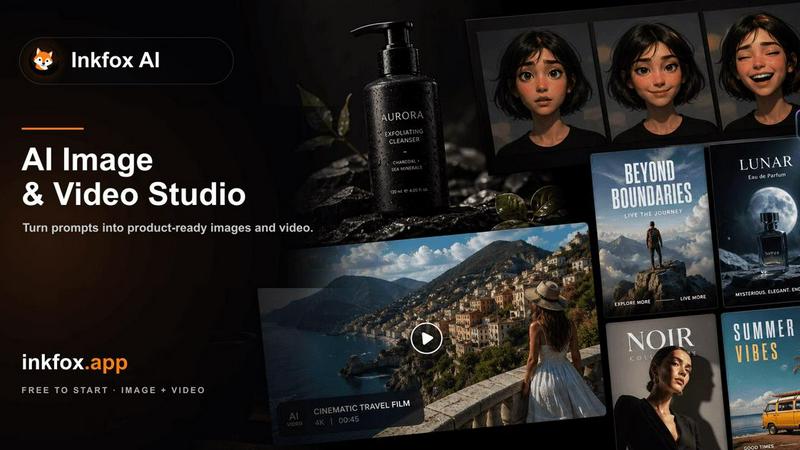
About Inkfox AI
Inkfox AI is my current favorite pick for anyone who needs high-quality AI-generated images without the usual friction. It is a completely free, unlimited AI image generator that throws the old gatekeeping out the window. There is no login, no sign-up, and no credit card required. You simply land on the page, type a prompt, and generate. This tool is built for creators, marketers, small business owners, and hobbyists who want to turn ideas into visuals instantly. The core value proposition is radical accessibility. While other platforms force you into a subscription or a freemium model with daily limits, Inkfox AI gives you unlimited generations on its base model and even offers premium models like Nano Banana 2.0, GPT Image 2.0, Flux, and Seedream for when you need that extra polish. It supports text-to-image, image-to-image editing, reference image creation, background removal, image upscaling, and even video generation. Whether you are designing ad creatives, product shots, social media visuals, or exploring artistic concepts, Inkfox AI provides a single, streamlined workspace. The interface is clean and intuitive, letting you focus on the creative process rather than navigating complex menus. It is a powerful statement that great AI tools should be for everyone, not just those willing to pay.
Features of Inkfox AI
Unlimited Free Generation with No Login
This is the feature that sets Inkfox AI apart from almost every competitor. You can generate an unlimited number of images without ever creating an account or signing in. This is perfect for rapid prototyping, brainstorming, or just having fun. The only catch is that guest results are stored in your browser, and you need to sign in from a result to keep it permanently and remove the watermark. It is a brilliant, low-friction approach that lets you test the tool thoroughly before committing to anything.
Multi-Model Support for Diverse Outputs
Inkfox AI is not a one-trick pony. It gives you access to a curated selection of state-of-the-art models, including Nano Banana 2.0, GPT Image 2.0, Flux, and Seedream. This is a huge advantage because different models excel at different styles. My personal favorite is Nano Banana 2.0 for its vibrant and creative interpretations, while GPT Image 2.0 is my go-to for more photorealistic and structured outputs. You can switch between them easily within the same workspace, giving you immense creative flexibility.
Comprehensive Prompt Structure and Controls
To get the best results, Inkfox AI encourages a detailed prompt structure that covers the subject, use case, style, and control parameters. The interface includes dedicated dropdowns for aspect ratio, lighting, composition, and style presets like photoreal, cinematic, anime, or 3D render. You can also upload a reference image to guide the generation. This level of control, combined with the ability to start from text, a reference image, or a visual goal, ensures that your outputs are targeted and usable, not just generic AI art.
Integrated Image and Video Generation Workflows
Inkfox AI is not limited to just images. It also supports video generation through models like Seedance 2.0, covering both text-to-video and image-to-video workflows. This makes it a versatile creative suite. You can start with a concept, generate a series of images, and then animate one of them, all within the same platform. The inclusion of background removal and image upscaling tools further rounds out the offering, making it a one-stop shop for many common design tasks.
Use Cases of Inkfox AI
Creating High-Impact Ad Creatives and Social Media Visuals
This is where Inkfox AI truly shines for marketers. You can generate multiple variants of ad creatives for Meta ads, banners, and social posts in seconds. The platform provides ready-made prompts for things like sneaker sports posters, beauty magazine covers, and iced coffee ads. By using the prompt structure to specify the target channel and production constraint, you can move from a rough idea to a polished, campaign-ready visual in a fraction of the time it would take with traditional design tools.
Generating Professional Product Photography for Ecommerce
For small business owners and ecommerce sellers, product photography can be a major expense. Inkfox AI offers a powerful solution. You can upload a reference image of your product and then describe the scene, background, angle, and ecommerce channel you need, such as a Shopify listing or an Amazon-style photo. The AI will generate realistic product shots in various settings, saving you the cost and hassle of a professional photoshoot. It is a game-changer for creating consistent, high-quality product listings.
Rapid Concept Art and Moodboard Creation for Designers
Designers and artists can use Inkfox AI to quickly visualize concepts and build moodboards. Starting from a rough text prompt, you can generate a wide variety of concept art, blog images, and visual ideas. The unlimited generation capability means you can explore countless directions without worrying about cost. This is invaluable for the early stages of a project when you need to iterate quickly and communicate visual ideas to clients or team members.
Producing Consistent Visual Assets for Brand Identity
Inkfox AI can help maintain a consistent visual style across different assets. By using a reference image and specific style presets, you can generate a series of images that adhere to a particular brand aesthetic. Whether you need a set of social media graphics, a collection of blog post headers, or a series of infographics like the "Hanfu structure infographic" example, the tool allows you to lock in a style and generate variations, ensuring brand coherence without manual effort.
Frequently Asked Questions
Is Inkfox AI really free and unlimited?
Yes, the base model of Inkfox AI is completely free and offers unlimited generations. There are no daily caps or hidden fees. You can generate as many images as you want without signing up. The only limitation for guest users is that images are stored locally in your browser. If you want to save them permanently and remove the watermark, you will need to sign in for free.
Do I need to create an account or log in to use Inkfox AI?
No, you do not. Inkfox AI is designed for instant access. You can start generating images immediately upon visiting the website without any sign-up or login. This is one of its strongest selling points. An account is only optional if you want to save your images to the cloud and access them from any device.
What AI models does Inkfox AI support?
Inkfox AI supports a range of powerful models. The primary ones include Nano Banana 2.0, GPT Image 2.0, Flux, and Seedream. For video generation, it supports Seedance 2.0. The platform allows you to switch between these models easily to achieve different styles and levels of quality, from quick drafts to polished, premium results.
Can I use my own images as a reference?
Absolutely. Inkfox AI supports reference image generation. You can upload a product photo or any other image and then describe the scene, background, angle, or style you want. The AI will use your reference as a guide to generate new images that match the desired context, making it perfect for product photography and brand-consistent visual creation.
Explore more in this category:
Similar to Inkfox AI
ImageAgent
Create and edit AI images through conversation, using text or reference images and refining results in chat.
GenX
All-in-one AI workspace to generate images, videos, and audio with multiple leading AI models.
Typebar
Every key you press lights up on an on-screen keyboard, and each shortcut is named. For screen recordings, demos and learning shortcuts.
AppIconGenerator
Generate iOS and Android app icons from any image and export all platform sizes for free.
AiAgeFilter
Free AI age filter: upload an adult portrait, add 10-40 years, meet your older self. No app needed.
Nano AI
Create and edit AI images, generate videos, and compare models in one creative workbench.
CutNoodle
Free browser tools for creators: edit video and audio locally, create subtitles, and turn public X activity into shareable visuals. No account.