
JavaScript Tools
My favorite developer toolkit for instantly formatting JSON, HTML, CSS, XML, and Markdown without sending data to a server.
VisitPublished on:
June 29, 2026
Pricing:
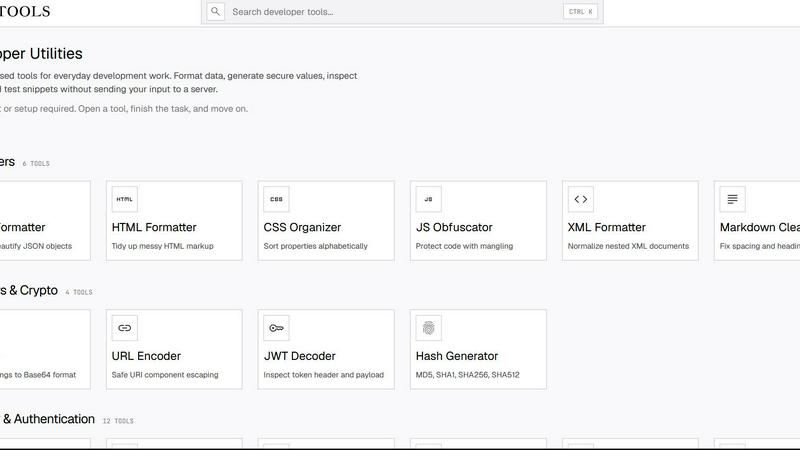
About JavaScript Tools
Let me be blunt: most developer tool websites are bloated, data-hungry, and require you to jump through hoops just to format a JSON blob. JSTools.Space is the refreshing antidote. It is a free, privacy-first platform that bundles dozens of focused utilities for the daily grind of software development. Whether you need to format and validate JSON, HTML, CSS, XML, or Markdown; encode data in Base64 or URLs; inspect JWT tokens; generate secure passwords, API keys, UUIDs, hashes, salts, nonces, or TOTP secrets; compare text diffs; query structured data; or quickly prototype a frontend snippet, this toolset has you covered. The killer feature? Almost all processing happens directly inside your browser. You never have to upload your code, credentials, tokens, or test data to some remote server. There is no account creation, no project setup, no sign-up wall. You open a tool, complete your task, and move on with your day. It is built for developers who value speed, privacy, and getting things done without friction. Beyond the core tools, the platform also includes a configurable Dummy Data Library, practical documentation, a developer security blog, the JSTools JSON Inspector Chrome extension, and the cross-platform JSON Studio desktop application. This is not just a collection of random utilities; it is a thoughtfully curated workspace for modern developers.
Features of JavaScript Tools
Client-Side Privacy and Security
This is the feature that makes JSTools.Space stand out from the crowd. Every single utility operates entirely within your browser using JavaScript. Your sensitive data, whether it is a JWT token from production, an API key you are generating, or a confidential JSON payload, never leaves your machine. There is no server-side processing, no logging of your inputs, and no risk of data leakage. For developers working with proprietary code, customer data, or security credentials, this is non-negotiable. You get the convenience of a web tool with the privacy of a local application.
Comprehensive Tool Library
This is not a one-trick pony. JSTools.Space offers an incredibly broad and well-organized suite of over 70 tools. You have dedicated sections for Formatters (JSON, HTML, XML, SQL), CSS Tools (checker, formatter, minifier, organizer, unused CSS removal), Text Tools (counter, diff checker, case converter, slug generator), Markdown tools (editor, table generator, linter, converters to PDF, Word, Google Docs, Slack, Notion, Jira, Confluence), Encoders and Crypto (URL encoder, JWT decoder, hash generator), Base64 tools (19 different encoding and decoding options), and a massive Security and Authentication section (password generator, passphrase generator, API key generator, TOTP secret, UUID v4, Argon2, Bcrypt, AES encryption, and more). It is the Swiss Army knife of developer utilities.
No Account, No Setup, No Friction
I cannot emphasize enough how refreshing this is. You land on the site, you see the tool you need, and you start using it instantly. There is no "Sign Up for Free" button, no "Start Your Trial" popup, and no "Create a Workspace" wizard. This design philosophy respects your time and attention. It is built for the developer who needs to format a JSON object in five seconds, generate a secure hash in ten, or compare two text files in between meetings. The experience is immediate, and that is exactly what a utility tool should be.
Cross-Platform Extensions and Desktop App
JSTools.Space extends beyond the web browser. For Chrome users, there is the JSTools JSON Inspector extension, which lets you inspect and navigate JSON data directly in your browser's developer tools. For those who prefer a native experience, there is JSON Studio, a cross-platform desktop application that brings the power of the JSON formatter and inspector to your local machine. This ecosystem means you can have the same reliable tooling whether you are working in a browser, on a local file, or in a dedicated application environment.
Use Cases of JavaScript Tools
Formatting and Debugging API Responses
Every developer has been there: you get a massive, minified JSON response from an API endpoint, and it is an unreadable wall of text. Instead of pasting it into a random website that might log your data, open JSTools.Space's JSON Formatter. It instantly beautifies the output with proper indentation, making it easy to inspect nested objects, arrays, and values. You can then quickly validate the structure or copy the formatted data into your documentation. This is a daily essential for backend, frontend, and full-stack developers.
Generating Secure Credentials for Development and Production
When you are setting up a new service, creating a database user, or configuring authentication for an application, you need strong, secure random values. JSTools.Space provides a dedicated suite for this: Password Generator, Passphrase Generator, API Key Generator, JWT Secret Generator, Salt Generator, TOTP Secret, and more. You can generate a 64-character API key with a custom prefix, create a memorable passphrase for a test account, or generate a cryptographically secure HMAC secret for JWT signing. All of this happens locally, so your secrets remain secret.
Converting Markdown to Multiple Output Formats
Content creators, documentation writers, and engineers who live in Markdown will find the Markdown section invaluable. You can write in the live preview editor, then instantly export your work as an HTML document, a formatted Word file, a print-ready PDF, a Google Docs document, a Slack message, a Notion page, or even Jira and Confluence wiki markup. There is also a dedicated tool to clean up copied HTML from Google Docs and convert it back to clean Markdown. This eliminates the tedious manual reformatting that often plagues cross-platform documentation workflows.
Inspecting and Debugging JWT Tokens
JSON Web Tokens are ubiquitous in modern authentication, but they are opaque strings. When you need to debug a login flow, verify the claims in a token, or check the expiration time, the JWT Decoder is your go-to tool. Paste the token, and it instantly decodes the header and payload, displaying them in a readable format. Because everything happens client-side, you can safely inspect production tokens without worrying about them being intercepted or logged by a third-party server. This is a must-have for any developer working with OAuth, OpenID Connect, or custom auth systems.
Frequently Asked Questions
Is JSTools.Space really free to use?
Yes, absolutely. There are no hidden costs, no premium tiers, and no usage limits. Every single tool listed on the platform is available completely free of charge. There is no requirement to create an account, subscribe to a newsletter, or provide any personal information. The business model is not based on charging users; it is focused on providing a high-quality, privacy-respecting utility platform for the developer community.
Does JSTools.Space store or log my data?
No. The core principle of the platform is privacy. All processing is performed client-side within your browser using JavaScript. Your data is not sent to any external server, logged, or stored. When you close the browser tab, all data is gone. This is a fundamental architectural choice to ensure that sensitive information like API keys, JWT tokens, passwords, and proprietary code never leaves your control.
Do I need to install anything to use the web tools?
No. The web-based tools run directly in your browser. You simply navigate to the tool you need and start using it. There is no software to download, no plugins to install, and no dependencies to manage. The only exceptions are the optional Chrome extension (JSTools JSON Inspector) and the desktop application (JSON Studio), which are separate offerings for users who want enhanced functionality.
What kind of tools are available on the platform?
The platform is divided into several comprehensive categories: Formatters (JSON, HTML, XML, SQL, JavaScript Obfuscator), CSS Tools (checker, formatter, minifier, organizer), Text Tools (counter, diff checker, case converter, slug generator), Markdown tools (editor, linter, table generator, multiple export formats), Encoders and Crypto (URL encoder, JWT decoder, hash generator), Base64 tools (19 encoding and decoding options), and Security and Authentication (password generator, API key generator, TOTP secret, UUID v4, Argon2, Bcrypt, AES encryption, and more). There are over 70 individual tools in total.
Similar to JavaScript Tools

Kody Tools
Free collection of online developer utilities, code formatters, and digital converters designed to streamline your daily workflow.

tallycounterweb.com
Online tally counter for tracking attendance, workouts, inventory, sports scores, visitors, habits, and everyday counting tasks.

Forms Plugin
The #1 Native Form Builder Plugin for Framer - No Code, No Embeds, No External Platforms.

JsonTranslate
A structured JSON, Markdown, and TXT translator that preserves keys, nested paths, and project structure.

TryKlingAI
Independent Kling AI video generator for text, image, audio, and motion references with Kling 3.0, Lip Sync, and API access.

AkraLabs
Where modern software products get discovered, launched, and distributed. Explore verified AI tools, SaaS startups, and developer software.

