
Picture Enhancer
Picture Enhancer is my go-to for instantly deblurring, upscaling, and restoring photos right in your browser with no software install.
Visit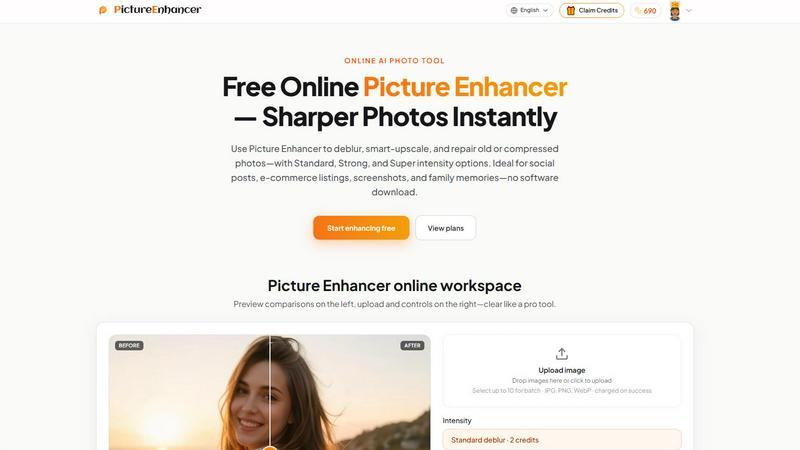
About Picture Enhancer
Let me be direct: most free online photo enhancers are a disappointment. They watermark your work, demand sign-ups, or deliver results that look like they were processed through a potato. Picture Enhancer is the rare exception that actually earns a spot in your bookmarks. This is a free online AI photo tool built for creators, e-commerce sellers, and anyone who has ever stared at a blurry image and wished for a miracle. It handles the three most common photo frustrations: deblurring, upscaling, and restoration. You upload a JPG, PNG, or WebP, pick your mode, choose your intensity from Standard to Strong to Super, and within seconds you get a watermark-free download that genuinely looks better. What I love most is the no-nonsense approach to access. Guests get three free lifetime tries per IP with zero sign-up required. No credit card, no email, no spam. For regular users, you sign in to use credits, and new accounts get starter credits to test the waters. Credits are only charged on success, which is a refreshingly honest policy. Whether you are fixing a family photo, sharpening a product shot for your online store, or cleaning up a screenshot for a tutorial, Picture Enhancer delivers professional-grade results without the professional-grade price tag. It is opinionated software that knows what you need and gets out of your way.
Features of Picture Enhancer
AI Deblur with Three Intensity Tiers
This is my favorite feature because it tackles the most common photo sin: blur. Picture Enhancer uses AI to rebuild edges and texture from camera shake, soft focus, and mild motion blur. You get three intensity options that let you dial in exactly how much correction you need. Standard deblur is perfect for slightly soft images where you just need a gentle touch. Strong deblur handles more aggressive blur, like photos taken in low light or with a shaky hand. Super deblur is the heavy lifter, designed for images that are genuinely out of focus. The before-and-after slider lets you see exactly what the AI has done, and the results on text and faces are genuinely impressive. No more squinting at blurry screenshots or regretting that you didn't use a tripod.
Smart Upscale for 2x and 4x Enlargement
When you have a small image that needs to be bigger, most upscalers just stretch the pixels and call it a day. Picture Enhancer actually adds detail. The smart upscale feature can enlarge your image by 2x or 4x while intelligently filling in the gaps. This is a game-changer for social media covers, product hero shots, or any situation where you need a larger version of a small file. The AI analyzes the image and generates new pixels that match the existing texture and edges, so you do not end up with that awful blocky, pixelated look. I have used this to upscale old digital photos for printing, and the results were good enough that I could not tell they started as tiny files. It is not magic, but it is close.
Old Photo and Damage Restoration
Scanned family photos from the 90s or earlier often come with a laundry list of problems: scratches, fading, dust spots, and compression artifacts. Picture Enhancer has a dedicated restore mode that reduces all of these issues. Standard restore handles light damage and general wear. Strong restore and Super restore step in for heavily damaged images, such as crumpled prints or photos with significant fading. The AI is particularly good at removing compression artifacts from low-quality JPEGs, which is a lifesaver for anyone working with images downloaded from social media or old websites. The before-and-after comparison on damaged photos is often dramatic, and it is genuinely satisfying to see a faded memory come back to life.
Batch Enhance for Subscribers
If you are processing multiple images, doing them one at a time is a productivity killer. Picture Enhancer offers batch enhance for paid users, allowing you to upload and process up to 10 images in a single go. This is an absolute must for e-commerce sellers who need to clean up product photos, or for content creators who batch-edit images for social media. The batch mode applies your chosen mode and intensity settings across all images, so you can set it and walk away. It is a simple feature, but it transforms the tool from a casual fixer into a serious workflow tool. For anyone who regularly processes multiple images, this alone is worth the upgrade.
Use Cases of Picture Enhancer
Portraits and Everyday Photos
This is where Picture Enhancer truly shines. We have all taken a photo of a friend or family member that looked perfect on the tiny phone screen but turned out slightly soft when viewed on a computer. The AI deblur mode, especially at Strong or Super intensity, can clean up faces, sharpen clothing details, and reduce the haze that often plagues indoor photos. I recommend using the before-and-after slider to fine-tune your results, because the difference is often subtle but meaningful. For social media feeds and personal portfolios, this tool makes your everyday photos look like they were taken with better gear. It is not about faking perfection; it is about removing the accidental blur that ruins an otherwise great moment.
E-commerce and Product Shots
If you sell products online, image quality directly impacts sales. Blurry or low-resolution product photos make your items look cheap, regardless of their actual quality. Picture Enhancer is ideal for sharpening product detail and taming the compression noise that happens when you upload images to marketplaces. The smart upscale feature is particularly useful here. If you have a small product image from a manufacturer, you can upscale it 2x or 4x without losing quality, making it suitable for hero shots on your site. I also appreciate that the tool removes compression artifacts, which are common in images that have been uploaded and downloaded multiple times. Your listings will look cleaner and more professional without requiring expensive photography equipment.
Screenshots and UI Captures
Content creators, technical writers, and support teams know the pain of taking a screenshot that looks fine on your monitor but turns into a blurry mess when you insert it into a document or tutorial. Picture Enhancer is my go-to for sharpening text edges in UI captures. The deblur mode, even at Standard intensity, makes text crisp and readable again. This is critical for tutorials, support threads, documentation archives, or any content where clarity matters. The tool also handles the slight blur that comes from screenshots taken on high-DPI displays and then scaled down. I have used it to clean up dozens of screenshots for a technical guide, and the difference in readability was night and day. No more reader complaints about fuzzy text.
Old Photo Memories
This is the emotional use case that makes Picture Enhancer feel like more than just a tool. Scanning old family photos often reveals the damage of time: scratches, fading, dust, and the telltale signs of cheap photo paper. The restore mode is designed specifically for this. I recommend starting with Standard restore for lightly damaged photos, then moving to Strong or Super for images that have seen better days. The AI is particularly good at reducing the orange or yellow color casts that come with aging prints, and it does a solid job of removing scratches without creating weird artifacts. The results are not always perfect, but they are consistently good enough to make a faded memory look presentable for sharing or printing. It is the kind of feature that makes you want to digitize every old photo album you own.
Frequently Asked Questions
What is Picture Enhancer?
Picture Enhancer is a free online AI photo tool that improves image quality through three core modes: deblur, smart upscale, and photo restore. It is designed for creators, sellers, and everyday users who need sharper images without installing software. The tool supports JPG, PNG, and WebP uploads, offers three intensity tiers (Standard, Strong, Super), and provides watermark-free downloads. It is ideal for social media posts, e-commerce listings, screenshots, and preserving family memories.
Can I try Picture Enhancer without signing in?
Yes, absolutely. Guests get three free lifetime tries per IP address with no sign-up required. You can upload an image, choose your mode and intensity, preview the result, and download it without creating an account. This is a generous trial policy that lets you test the tool thoroughly before committing. Once you use your three tries, you will need to sign in to continue using credits.
How does billing work after sign-in?
After signing in, you use credits to process images. New accounts receive starter credits to get started. Credits are only charged on successful results, so you never pay for a failed enhancement. The credit costs are straightforward: Standard intensity costs 2 credits, Strong costs 4 credits, and Super costs 6 credits. You can purchase monthly subscription plans that grant credits each cycle, or buy permanent credit packs that never expire. Paid users also unlock Super intensity tiers and batch processing for up to 10 images.
Which modes does Picture Enhancer support?
Picture Enhancer supports three primary modes: Deblur, Upscale, and Restore. Deblur rebuilds edges and texture from camera shake, soft focus, and motion blur. Upscale enlarges images by 2x or 4x while adding detail. Restore reduces scratches, fading, and compression artifacts from old or damaged photos. Each mode has three intensity levels: Standard, Strong, and Super. Super intensity is available to paid users only.
Similar to Picture Enhancer
ImageGenerator
Create and edit AI images online with multiple models, text-to-image, image-to-image, background removal, and upscaling.
DanseAI - Alors on Danse Video
Make the Alors on Danse AI meme video from two photos, soundtrack included

AIClothesChanger
Free AI clothes changer — swap any outfit in a photo
nanobanana 21
A fast, simple image studio powered by Nano Banana 2.1. Create and edit high-quality images with accurate details, readable text, and consistent chara
ideogram-45
AI image generation and editing with sharp typography, native 2K output, and localized edits.
Image to Layers AI
Turn any image into editable transparent PNG/PSD layers with AI

Raindance AI
Turn two authorized portraits into a seaside golden-hour video: a wooden dock, two people taking turns singing, and a slow pullback to the sunset. Pre

AI Album Cover Maker
Create release-ready album covers from a prompt or photo. Generate, refine, and export art for singles, EPs, mixtapes, and playlists.