
PixUnblur
PixUnblur is my go-to for instantly fixing blurry photos with AI that sharpens details and reduces noise without ruining the natural look.
Visit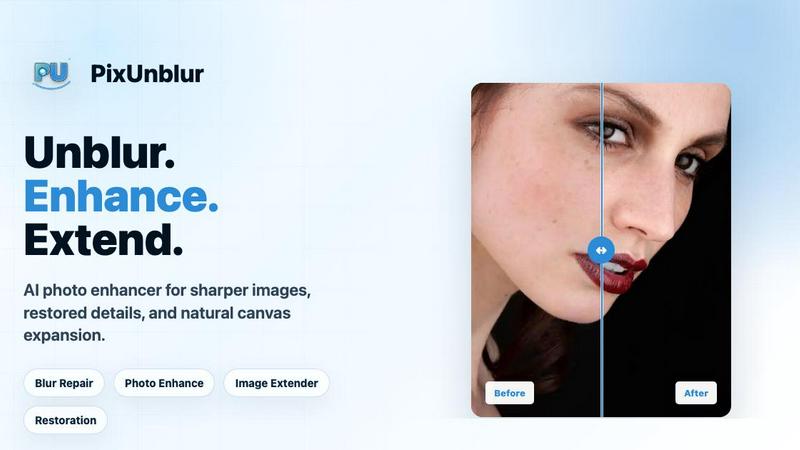
About PixUnblur
PixUnblur is, in my opinion, the most practical and accessible AI-powered photo sharpener on the market right now. It is specifically designed to rescue blurry, soft, or low-resolution images and transform them into crisp, detailed, and natural-looking photos. Unlike many tools that over-sharpen and create an artificial, plastic-like finish, PixUnblur focuses on intelligent restoration. It uses advanced AI to analyze the specific type of blur in your image, whether it is camera shake, missed focus, compression artifacts, or low-light noise, and then applies a targeted fix. The result is a clearer image that retains the original subject, framing, colors, and mood. This tool is perfect for a wide range of users, from professional photographers and e-commerce designers who need clean, high-resolution assets, to everyday users who want to salvage a blurry photo of a pet, a family gathering, or a travel memory. The main value proposition is simple: upload a blurry photo, let the AI work its magic in seconds, and download a version that is ready for social media, printing, or long-term storage. It takes the guesswork and complex manual editing out of photo restoration, making professional-level clarity available to everyone.
Features of PixUnblur
AI-Powered Blur Detection and Repair
This is the core feature that sets PixUnblur apart. The AI doesn't just apply a blanket sharpening filter. Instead, it intelligently analyzes the entire image to identify specific problem areas, such as soft edges from missed focus, motion blur from camera shake, and the blocky artifacts of compression noise. It then applies a sophisticated, multi-step process of sharpening, denoising, and detail recovery. The result is a natural-looking enhancement that restores clarity to subjects like eyes and hair without creating harsh, unnatural halos or a fake HDR effect. This targeted approach ensures that the repaired image looks like a high-quality original, not a heavily processed digital artifact.
Noise Reduction and Texture Recovery
One of the biggest challenges in fixing blurry photos is the introduction of grain and noise. This feature is a personal favorite because it handles that problem so elegantly. PixUnblur's AI is trained to differentiate between fine, desirable texture (like the weave of a fabric or the grain of wood) and unwanted digital noise. It actively minimizes the grainy, speckled look that often plagues low-light and high-ISO images while simultaneously recovering the fine textures that make a photo feel real and lifelike. This dual action ensures that your final image is not only sharper but also cleaner, preserving the authentic feel of the original scene.
High-Resolution Output for Print and Digital
Many online tools will sharpen an image but leave you with a low-resolution file that is unusable for print. PixUnblur is different. It generates high-quality, high-resolution outputs that are versatile enough for any purpose. Whether you need a crisp image for a professional portfolio, a detailed product shot for an e-commerce catalog, or a large-format print for your wall, this tool delivers. The AI upscales and enhances the image in a way that adds genuine detail rather than just stretching pixels, making the final result look far superior to the original blurry source. This feature alone makes it a powerful asset for designers and photographers who need reliable, print-ready assets.
Batch Processing and Intuitive Workflow
For anyone who needs to fix more than one photo at a time, this feature is a game-changer. PixUnblur supports batch processing, allowing you to upload and enhance multiple images simultaneously. This dramatically speeds up workflows for events, product shoots, or social media content creation. The interface is clean and intuitive on both web and mobile platforms, making the entire process feel effortless. You simply drag and drop your images, the AI processes them in the background, and you can download all the clear results with a single click. It removes the tedious, repetitive work from photo editing, letting you focus on the creative side of your projects.
Use Cases of PixUnblur
Fixing Soft Portraits and Headshots
This is where PixUnblur truly shines. I have seen it turn soft, out-of-focus portraits into stunning, professional-quality headshots. It brings back the sharpness in the eyes, defines the texture of the hair, and clarifies facial contours that were lost to camera shake or poor lighting. This is ideal for anyone who needs a great profile photo for LinkedIn, a dating app, or a personal website. It is also a lifesaver for photographers who captured a perfect moment but missed the focus. Instead of deleting the shot, you can use PixUnblur to recover the clarity and save the image.
Repairing Low-Light and Night Photography
Night shots, indoor party photos, and dimly lit scenes are notoriously difficult to fix. They often combine motion blur, camera shake, and a significant amount of digital noise. PixUnblur handles this complex combination with impressive skill. It reduces the grainy noise without smoothing away important details, and it strengthens the key edges of subjects like people and objects. The best part is that it preserves the original mood and atmosphere of the photo, so you don't lose the feeling of the moment. It is the perfect tool for turning a blurry, noisy memory into a clear, shareable photo.
Enhancing Travel and Landscape Photos
We have all been there: you take a breathtaking photo of a mountain range or a city skyline, only to find it is slightly soft or hazy when you look at it on your computer. PixUnblur is excellent for this scenario. It clarifies the distant details, cuts through the gray haze, and sharpens the textures of rocks, trees, and buildings. It can even improve the look of photos taken from a moving car or a shaky hand. This makes it an essential tool for travel bloggers, social media influencers, and anyone who wants their vacation photos to look as amazing as the real-life view.
Clarifying Blurry Product Images for E-commerce
In the world of online shopping, a clear product image builds trust. A blurry photo can make a product look cheap or unprofessional. PixUnblur is a fantastic solution for e-commerce sellers. It clarifies product edges, brings out the texture of materials like fabric or leather, and sharpens small details like labels and stitching. It also effectively reduces the compression blur that often occurs when images are uploaded to online marketplaces. The result is a more trustworthy and appealing product listing that can lead to higher conversion rates and fewer returns.
Frequently Asked Questions
What types of blur can PixUnblur fix?
PixUnblur is designed to handle a wide variety of common blur types. This includes camera shake, where the entire image is smeared; missed focus, where the subject is soft; compression artifacts, which create blocky or fuzzy areas; and low-light noise, which adds grain and reduces detail. It is also effective at fixing the overall softness that comes from low-resolution images. The AI is trained to identify the specific type of blur and apply the most appropriate correction.
Will AI blur repair change the original look of my photo?
The primary goal of PixUnblur is to restore clarity while preserving the original character of the photo. The AI is specifically trained to avoid harsh sharpening effects, plastic-looking skin, and unnatural HDR artifacts. It focuses on the subject, framing, colors, and natural feel of the original image. While the image will be significantly clearer and more detailed, it should still look like a natural photograph, not a heavily processed digital creation.
How long does it take to process a single image?
The processing time is remarkably fast. For most standard images, the AI can analyze and repair the blur in a matter of seconds. The exact time can vary slightly depending on the resolution of the uploaded image and the complexity of the blur, but the tool is designed for speed and convenience, allowing you to get your clear results almost instantly.
Is there a limit on the file size or format I can upload?
PixUnblur supports the most common image formats, including JPG, PNG, and WebP. While specific file size limits are not stated, the tool is optimized for standard high-resolution photos from modern cameras and smartphones. If you are working with extremely large files, you may want to ensure they are within a reasonable size for the web to ensure fast processing.
Pricing of PixUnblur
PixUnblur offers a tiered subscription model to suit different usage levels. New users can start with free credits to test the service before committing to a paid plan.
Basic - $9.9 / month
This plan is designed for light, occasional use, such as fixing a few personal photos or creating daily social media assets. It includes 2400 yearly credits (up to 240 images), batch processing, no watermark, a commercial license, and email support.
Creator - $24.9 / month
This is the most popular plan, and for good reason. It is perfect for creators and small teams who need more capacity. It includes 6600 yearly credits (up to 660 images), all the features of the Basic plan, plus priority support to ensure you get help quickly.
Master - $49.9 / month
This plan is tailored for high-volume batch production. It is best suited for professional photographers, e-commerce businesses, and large teams. It includes 14400 yearly credits (up to 1440 images), batch processing, and priority support, giving you the power to process a large number of images efficiently.
Similar to PixUnblur
GenX
All-in-one AI workspace to generate images, videos, and audio with multiple leading AI models.

Bloom
An adaptive AI tutor that turns topics or your materials into courses, lessons, and answers tailored to how you learn.
Lemongraph
Almost every conversation ends with a promise. Lemongraph keeps track of them for you and lines up your day the way you would.

CustomerFlows
Track, manage, and convert every lead, in one place.

Zeptap
Zeptap lets AI use your real iPhone like you do: open apps, read the screen, tap, swipe and type. Reply to DMs, post Stories, book rides, test apps.

FreeVideoGenerator
Free AI video generator for text and photos, powered by Sora 2, Veo 3.1 and Wan. Get free starter credits and watermark-free downloads.

ChatterAPI
One API key and one credit balance for Reddit and X data. REST endpoints and a hosted MCP server, so your code and your agents call the same tools.
BacklinkBot
AI SEO agent that finds pages ranking for your keywords, pitches the people behind them from your inbox, and follows up. You approve every send.