
StyleCut
StyleCut is my go-to for virtually trying on over 70 salon-inspired hairstyles and colors on your own photo before committing to a cut.
Visit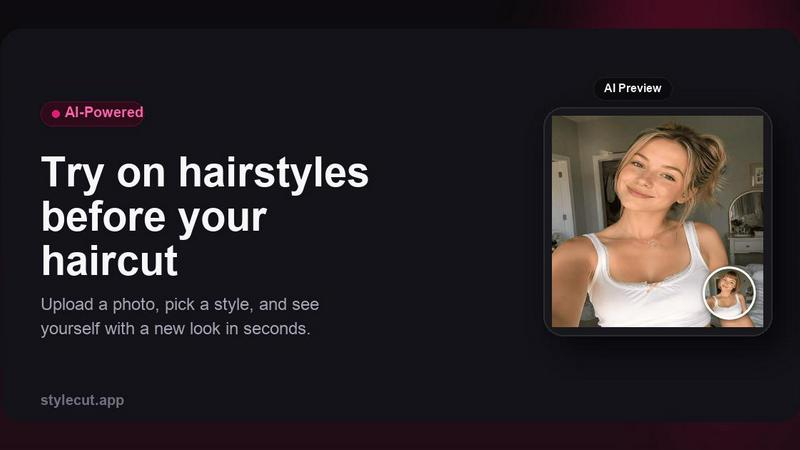
About StyleCut
Let me be brutally honest: getting a bad haircut is a special kind of hell. You walk out of the salon, fake a smile, and spend the next few weeks obsessively checking your reflection, praying it grows back faster. StyleCut is the antidote to that anxiety. This is not just another filter app; it is a serious, AI-powered hairstyle preview tool that lets you try before you cut. Upload a clear, front-facing photo, and you gain access to a curated library of over 70 hairstyle directions. We are talking everything from sharp pixie cuts and classic bobs to textured fades, voluminous curls, intricate braids, trendy bangs, and even dramatic hair color changes. The AI generates startlingly realistic previews directly on your actual face, analyzing your unique features to show you how a style will actually look on you, not on a model. This tool is built for anyone who has ever stood in front of a mirror, unsure. Whether you are a man debating a high fade, a woman considering a bold lob, or someone looking to experiment with balayage, StyleCut lets you test the idea, judge the shape and length, and walk into your stylist's chair with absolute, unshakeable confidence. It is free, it requires no account, and it works entirely in your browser. Stop guessing. Start knowing.
Features of StyleCut
70+ Curated Hairstyle Directions
This is not a random grab bag of styles; it is a carefully selected collection that covers the full spectrum of modern haircuts. From the precision of a graduated bob to the effortless cool of a shag, from intricate dutch braids to classic Hollywood waves, the library is organized by type, gender, and texture. My personal favorite is the "Sideswept Pixie" because it nails the tricky balance between edgy and elegant. You can browse popular picks, explore braids and updos, or filter specifically for male or female styles. It gives you a curated starting point so you are not overwhelmed by choice, but you still have the freedom to explore and discover something you might never have considered.
Instant Realistic Hairstyle Preview
The magic happens in seconds. You upload your photo, pick a style, and the AI gets to work. It does not just slap a wig on your head; it analyzes your face shape, hairline, and facial structure to generate a realistic preview that actually looks like you. The results are high-definition and shockingly accurate, allowing you to see how the length frames your jaw, how the volume sits on your crown, and how the bangs interact with your forehead. This is the feature that kills the fear of the unknown. You can trust this preview to be a reliable representation of the final result, making it the single most powerful tool for pre-haircut decision making.
Hair Color Experimentation
Changing your hair color is an even bigger commitment than a cut, and StyleCut handles this with remarkable finesse. You are not limited to basic "brown" or "blonde." The tool allows you to preview a spectrum of color changes, from natural highlights and subtle ombré to bold, fashion-forward shades. It intelligently applies the color to your hair texture, showing you how highlights might fall in your waves or how an all-over color might look against your skin tone. For anyone who has ever wondered, "Would I look good as a redhead?" this feature is your risk-free answer. It is the digital equivalent of a professional color consultation, and it is available at zero cost.
Privacy-First, No-Account Design
This is the feature that sets StyleCut apart from the data-hungry apps you are used to. There is no signup, no email required, and no personal data harvested. Your photos are processed in real-time with secure encryption, and they are never stored, shared, or used for any training purposes. Your hairstyle try-on session is completely private and ephemeral. This is a massive relief in an era where every app wants a piece of your identity. StyleCut respects that your image is yours alone. It is a refreshingly straightforward, privacy-centric approach that lets you focus on finding your next great haircut without worrying about where your photo will end up.
Use Cases of StyleCut
The Pre-Salon Consultation
This is the most obvious and powerful use case. Instead of walking into a salon with a vague description or a photo of a celebrity with a completely different face shape, you arrive with a crystal-clear visual of the style on your own face. You can show your stylist exactly what you want, eliminating miscommunication and ensuring you both have the same end goal in mind. I have personally used this to negotiate the length of a bob with my barber, and it saved us five minutes of "a little shorter" back-and-forth. It gives you the vocabulary and the visual reference to have a productive, professional conversation with your stylist.
The "Should I Go Short?" Experiment
Cutting off significant length is terrifying. It is the single biggest leap of faith in the hair world. StyleCut is the safety net for this decision. Before you commit to a pixie cut or a dramatic fade, you can preview it on your own photo. See how your face shape reacts to less hair. See if the short back and sides complements your jawline. This use case is about eliminating the fear of regret. You get to live with the short style for a few minutes, compare it to your current look, and make a confident choice. It turns a high-risk decision into a low-stakes experiment.
The Virtual Hair Color Diary
Are you thinking about going blonde but unsure about the maintenance? Curious about how a deep brunette would look for the fall? Use StyleCut to create a virtual diary of color options. You can try on different shades, from subtle balayage to bold all-over color, and see how they look in different lighting conditions (using your own photo's lighting). This is perfect for planning seasonal changes or for those who are simply indecisive. You can compare three different color options side-by-side, download the results, and even show them to a friend for a second opinion before you book that color appointment.
The Post-Breakup or New Job Reinvention
A major life change often calls for a new look, but the pressure to get it right is immense. StyleCut is your private, judgment-free zone for reinvention. Whether you are celebrating a new promotion or moving on from a relationship, you can explore bold, transformative styles you would never normally consider. Try on that asymmetrical bob you have been eyeing. See how you look with curtain bangs or a sleek, center-parted style. This use case is about exploration and empowerment. It gives you the freedom to play with your identity and find a look that reflects the new chapter in your life, all without the risk of a public haircut disaster.
Frequently Asked Questions
Is StyleCut really free to use?
Yes, absolutely. One of the things I love most about StyleCut is that it is completely free to try, and there is no account required. You can upload your photo, explore over 70 hairstyles, and download your favorite previews without spending a dime or handing over your email address. It is a genuinely generous offering that removes all barriers between you and your next great haircut.
What kind of photo works best for the AI preview?
For the best and most realistic results, you need a clear, front-facing photo with good, even lighting. Your face should be fully visible, with your hair pulled back if possible, so the AI can accurately map your face shape and hairline. Avoid photos with heavy shadows, extreme angles, or other people in the frame. Think of it as a passport photo for your hair. A high-resolution image will yield a sharper, more convincing preview.
How does StyleCut protect my privacy and my photo?
This is a critical question, and the answer is reassuringly simple. StyleCut processes your photo in real-time on its secure servers. The image is encrypted during processing and is never stored, shared, or used for any training or marketing purposes. Once you close the browser tab or download your preview, your photo is gone. It is a privacy-first design that treats your image with the respect it deserves. You can experiment with complete peace of mind.
Can I compare multiple hairstyles side-by-side?
Yes, and this is one of the tool's most valuable features. StyleCut allows you to generate previews for multiple styles and then compare them directly on the same screen. This is incredibly useful for narrowing down your options. You can pit a classic bob against a trendy shag, or compare a side-part with a center-part, all on your own face. This visual comparison is far more effective than trying to remember what each style looked like, and it makes the final decision much easier.
Explore more in this category:
Similar to StyleCut

xfiles
PDFs, images and audio. No uploads. No account. No added watermarks.
AnyFileKit
Free browser file tools: translate the text in pictures, compress, convert and edit images, PDFs and video. No sign-up.
ImageGenerator
Create and edit AI images online with multiple models, text-to-image, image-to-image, background removal, and upscaling.

DanseAI - Alors on Danse Video
Make the Alors on Danse AI meme video from two photos, soundtrack included
AIClothesChanger
Free AI clothes changer — swap any outfit in a photo
SightRadar
Face recognition API, a drop-in replacement for AWS Rekognition. Index, search, compare and detect faces, billed per photo with no subscription.
nanobanana 21
A fast, simple image studio powered by Nano Banana 2.1. Create and edit high-quality images with accurate details, readable text, and consistent chara
ideogram-45
AI image generation and editing with sharp typography, native 2K output, and localized edits.