
WriteToMail
WriteToMail is my favorite way to automate law firm mail directly from Clio, printing and sending everything for you.
Visit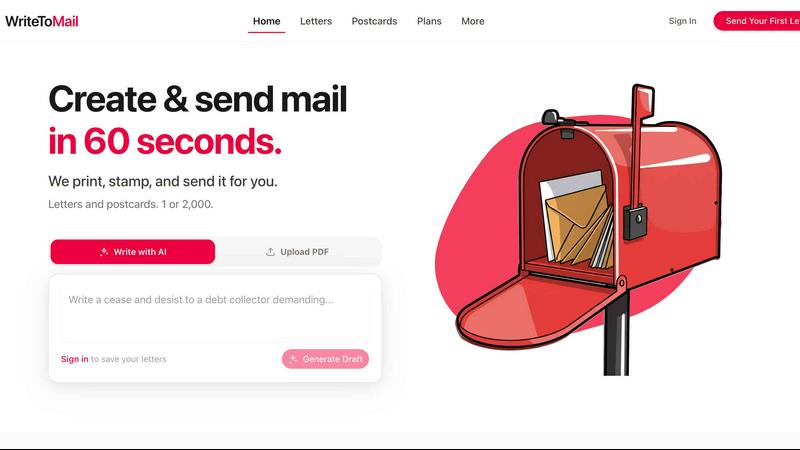
About WriteToMail
Let’s be honest: if you are still printing, folding, stuffing, and stamping letters by hand in 2026, you are wasting time and money. WriteToMail is the antidote to that tedious, error-prone workflow. It is a web-based platform and Clio-integrated service that automates the entire physical mail process for modern law firms and businesses. Instead of wrestling with a printer and a roll of stamps, you type your message (or let AI draft it for you), and WriteToMail handles the rest: professional printing, envelope addressing, and USPS First-Class delivery. This includes certified mail with electronic return receipts, which is a godsend for legal professionals who need proof of delivery.
The product is opinionated in its design, favoring speed and simplicity over bloated features. It is built specifically for legal workflows, but its utility extends to any business that sends physical correspondence. Whether you need to send a single client intake letter or two thousand postcards for a marketing campaign, WriteToMail makes it possible in seconds. The native Clio integration is a standout, pulling contact data automatically so you never have to copy-paste an address again. Every send includes address verification, tracking, and delivery confirmation. In short, WriteToMail transforms a chore into a frictionless, trackable, and professional operation. My personal recommendation: if you send more than ten letters a month, you are doing yourself a disservice by not using this.
Features of WriteToMail
AI-Powered Drafting
This is my favorite feature because it eliminates the dreaded blank page. Describe your letter in plain English, and WriteToMail’s AI generates a professional draft in seconds. You can then fine-tune fonts, styles, and wording with the visual editor. It is not just a gimmick; it genuinely produces usable, well-structured legal correspondence. For example, you can type "demand letter for unpaid invoice to a client named John" and get a polished draft ready for customization. This feature alone saves paralegals and assistants hours each week.
Native Clio Integration
WriteToMail is built with legal professionals in mind, and the Clio integration is the crown jewel. It automatically pulls contact data from your Clio account, including names, addresses, and case details. This means no manual data entry, no copy-paste errors, and no wasted time looking up client information. You select a matter, and the recipient fields populate instantly. For law firms using Clio, this integration transforms mail from a separate task into a seamless part of your case management workflow. It is opinionated software that respects your time.
Bulk Mailing with Personalization
Need to send 500 letters or 2,000 postcards? WriteToMail handles it effortlessly. Upload a CSV or Excel file with your recipient data, and the platform personalizes each piece automatically. You can map fields like customer name, discount codes, or custom messages directly into the letter template. The system then prints, stamps, and mails each piece as an individual, professional-looking document. This is perfect for marketing campaigns, annual notices, or mass client communications. Volume discounts make it cost-effective, and tracking is included for every single piece.
Certified Mail with Electronic Return Receipts
For legal and compliance use cases, this feature is non-negotiable. WriteToMail supports certified mail with electronic return receipts, providing irrefutable proof of delivery without the hassle of paper green cards. You get a timestamped, digitally signed receipt that is stored in your dashboard. This is critical for serving notices, demand letters, and court-filed documents. It is one of the key reasons law firms choose WriteToMail over generic mailing services. My advice: use this for anything where proof matters.
Use Cases of WriteToMail
Client Intake and Onboarding
When a new client signs a retainer, you need to send a welcome letter, engagement agreement, and initial disclosures immediately. WriteToMail lets you generate these documents in seconds using AI, pull the client’s address from Clio, and have a professional letter in the mail that same day. No more printing, scanning, or forgetting to send a follow-up. The tracking feature ensures you know exactly when it arrives. This is a huge win for client experience and firm efficiency.
Demand and Cease-and-Desist Letters
Sending a demand for payment or a cease-and-desist letter is often time-sensitive and requires proof of delivery. WriteToMail’s certified mail feature with electronic return receipts is perfect here. You can draft the letter using the AI template, send it with a few clicks, and receive a legally valid receipt. This eliminates the need to visit the post office or maintain a separate certified mail log. It is faster, more reliable, and fully auditable.
Bulk Marketing Campaigns
Businesses and law firms alike can leverage WriteToMail for direct mail marketing. Upload a list of past clients or prospects, personalize each postcard or letter with their name and a custom offer, and send them all at once. The platform handles the printing and postage, and you can track delivery from the dashboard. This is ideal for seasonal promotions, re-engagement campaigns, or announcing new services. The cost is predictable, and the results are measurable.
Court Filings and Legal Notices
While not a replacement for e-filing, physical court filings and legal notices still require mailed copies to opposing counsel or parties. WriteToMail streamlines this process by allowing you to upload a PDF of the filing, specify the recipient, and send it via certified mail with tracking. The electronic return receipt provides a digital paper trail for your records. This is a simple, reliable way to handle a procedural requirement that often gets overlooked until the last minute.
Frequently Asked Questions
How much does it cost to send a letter?
Each letter includes printing, the envelope, and USPS First-Class postage. Volume discounts are available for bulk mailings. The Business plan is $20 per month with metered billing, meaning you only pay for what you send. There are no hidden fees or minimums. You can get started without an account or credit card to test the service.
How long does delivery take?
Letters are printed and mailed within 1 to 2 business days of submission. USPS First-Class Mail then delivers in 5 to 7 business days. The total time from your click to their mailbox is typically 6 to 9 business days. For certified mail, delivery times may vary slightly due to signature requirements.
Where can you deliver?
WriteToMail delivers to all addresses within the United States via USPS First-Class Mail. This includes PO boxes, residential addresses, and business locations. International delivery is not currently supported, but the service covers all 50 states and US territories.
Is my letter content private?
Absolutely. Letters are printed by a SOC 2 Type II and HIPAA compliant mail partner in a secure facility. Your data is encrypted in transit and at rest, and it is only accessible through your account. WriteToMail does not store or share your letter content beyond what is necessary to fulfill the mailing. This is a critical feature for law firms handling sensitive client information.
Pricing of WriteToMail
The Business plan is $20 per month with metered billing. This includes access to the web dashboard, AI drafting, Clio integration, and all standard features. Per-letter costs vary based on volume, with discounts available for bulk mailings. Certified mail with electronic return receipts incurs an additional fee per piece. You can start sending letters without an account or credit card to evaluate the service. For specific pricing on bulk or enterprise plans, contact WriteToMail directly.
Explore more in this category:
Similar to WriteToMail
DockGroups
Your Dock, your rules. Simple and clean. Workflows in one click


Screen Tester
Free online screen tester for checking dead pixels, colors, brightness, contrast, refresh rate, and display quality.

LinkedIn Translator
Turn rough notes into credible LinkedIn writing, or decode professional jargon into plain English.


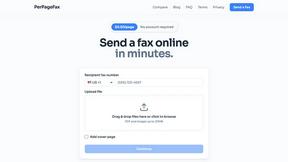
PerPageFax
PerPageFax lets you send a fax online from any browser for a flat $0.50 per page — no account, no subscription, no fax machine.

Clipy
Free, no-watermark screen recorder + instant share links. A Loom alternative: record, stop, share. No signup, no time cap, no app to watch.