
Subclip
Subclip is my favorite AI editor that turns hours of manual editing into a single click with voice cloning and auto-captions.
Visit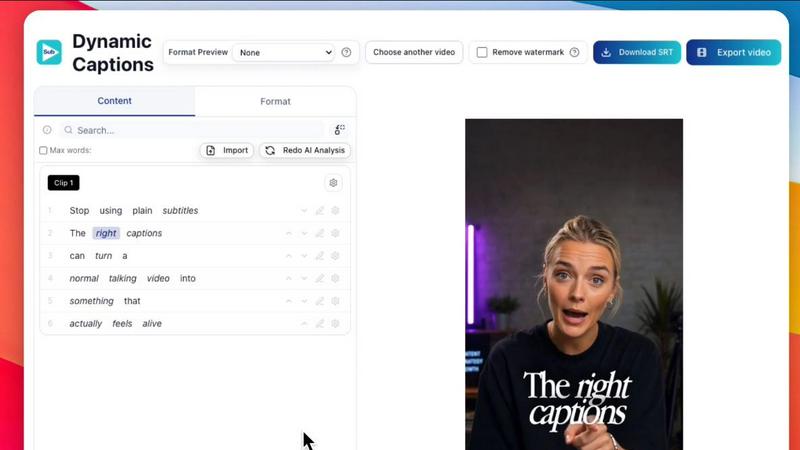
About Subclip
If you have ever found yourself staring at a complex, multi-track timeline in a traditional video editor, wondering why a simple task like removing a mistake takes twenty minutes, Subclip is the tool that will change your workflow forever. Subclip is an AI-powered video editor built specifically for creators, marketers, educators, and content teams who value their time. It fundamentally reimagines video editing by letting you work with a transcript like a Google Doc. Just drag in your video, and the entire script becomes editable text. You can delete a sentence, rearrange a paragraph, or trim a pause directly from the transcript, and the video timeline updates instantly. No scrubbing, no razor blades, no frustration. Beyond this core editing magic, Subclip is a complete post-production suite. It offers one-click silence and filler word removal, auto-generated subtitles in 48+ languages, and a voice cloning feature that lets you re-record parts of your video in your own natural voice. For global reach, it supports AI dubbing into 21+ languages while preserving your original tone and even the background music. Subclip is designed for YouTubers, podcasters, course creators, coaches, and agencies who need to produce high-quality video content at scale. It streamlines the entire production pipeline from rough cut to final export, and even integrates with professional editors like DaVinci Resolve, Final Cut Pro, and Adobe Premiere Pro. With a freemium pricing model that includes a generous free tier, Subclip removes the complexity of traditional tools and replaces it with intuitive, AI-driven efficiency. It is, in my opinion, the most sensible upgrade a busy creator can make.
Features of Subclip
Transcript-Based Video Editing
This is the feature that makes Subclip a genuine game-changer. Instead of manually scrubbing through a timeline to find the exact moment you want to cut, you simply open the transcript of your video. Every word is clickable and editable. Want to remove a long pause or a mistake? Just delete the words from the transcript. Need to rearrange a section? Cut and paste the text. The video timeline follows your edits automatically, saving you hours of manual rework. It transforms a visual editing task into a simple text editing task, which is far more intuitive and faster for most creators.
AI Voice Cloning and Dubbing
Subclip allows you to clone your own voice and use it to re-record parts of your video seamlessly. This is incredibly useful for fixing a mispronounced word or a poorly delivered line without needing to reshoot the entire scene. Even more powerful is the multi-language dubbing feature. You can translate your video into 21+ languages, and Subclip will generate a new audio track using your cloned voice. The result is a natural-sounding narration that maintains your original tone, emotion, and even the background music. It is the closest thing to having a multilingual version of yourself.
One-Click Silence and Filler Word Removal
This feature alone can reclaim a massive percentage of your editing time. Subclip automatically scans your video for awkward silences, dead air, and filler words like "um," "uh," and "like." With a single click, you can remove all of them, tightening up your video and improving pacing immediately. It is perfect for podcasters, educators, and anyone who records long-form content. The result is a polished, professional-sounding final product that keeps your audience engaged from start to finish, without you having to manually cut out every single pause.
AI-Powered Clipping and Viral Score Detection
Subclip does not just help you edit; it helps you discover your best content. Its AI engine scans your long-form videos for high-energy segments, punchlines, and key emotional shifts. It then assigns a "Viral Score" to each potential clip, helping you identify the moments most likely to perform well on social media. This turns a tedious process of manually hunting for highlights into an automated, data-driven workflow. You can quickly extract short, high-retention clips for platforms like TikTok, YouTube Shorts, and Instagram Reels, dramatically increasing your content output.
Use Cases of Subclip
For YouTubers and Content Creators
If you are a YouTuber, your biggest bottleneck is often the time spent editing long-form videos. Subclip solves this by letting you edit an hour-long podcast or vlog in minutes using the transcript. You can remove mistakes, tighten pacing, and add stunning, auto-generated captions that boost viewer retention. The AI clipping feature then helps you repurpose that long-form content into multiple short clips for social media, all without leaving the platform. It is the ultimate tool for anyone looking to scale their content production without sacrificing quality.
For Coaches and Course Creators
As a coach or educator, your primary asset is your expertise, not your editing skills. Subclip allows you to record a course once and then dub it into 20+ languages using your own cloned voice. This instantly expands your potential student base globally without the need for expensive translators or voice actors. You can also use the transcript editing to clean up your lectures, removing tangents and filler words to create a more concise and professional learning experience. It turns a single recording session into a globally accessible product.
For Podcasters
Podcasters often deal with hours of raw audio that need to be cleaned up and edited. Subclip excels here with its one-click silence and filler word removal, instantly making your podcast sound more professional and engaging. The transcript-based editing allows you to easily rearrange segments or cut out entire sections of conversation. Furthermore, the AI dubbing feature lets you offer your podcast in multiple languages, attracting a global audience. It is a complete post-production studio for audio and video podcasts.
For Marketing Agencies and Freelancers
Agencies and freelancers need to deliver high volumes of video content quickly and cost-effectively. Subclip provides unlimited transcription and export, team collaboration features, and seamless integration with professional editors like DaVinci Resolve. You can have multiple team members work on a project simultaneously, share feedback directly in the platform, and export finished clips to your preferred NLE for final polish. It reduces the per-video production cost and turnaround time, allowing you to take on more clients and increase your agency's output.
Frequently Asked Questions
How does the transcript-based editing actually work?
When you upload a video to Subclip, it automatically generates a full, time-coded transcript. You can then edit this transcript just like you would a document in Google Docs. If you delete a sentence from the transcript, the corresponding section of the video is automatically removed from the timeline. If you cut and paste a paragraph, the video clip moves with it. This eliminates the need to manually split clips and drag them around on a timeline, making the editing process incredibly fast and intuitive.
Can I really dub my video into other languages using my own voice?
Yes. Subclip uses advanced AI voice cloning to create a digital model of your voice. When you choose to dub a video into another language, the platform translates the transcript and then generates a new audio track using your cloned voice. The result retains your natural speaking tone, emotion, and pacing. It is not a robotic text-to-speech; it sounds remarkably like you speaking the other language, making it perfect for global content distribution.
Is there a limit on how many videos I can edit or how many subtitles I can generate?
Subclip offers a free tier that allows you to test the platform with limited minutes. However, their paid plans are designed to remove these limitations. Depending on your plan, you can get access to unlimited transcription, unlimited subtitle generation, and unlimited export minutes. This is a significant advantage over many competitors that charge per minute or per video, especially for high-volume creators and teams.
What file formats and export options does Subclip support?
Subclip supports a wide range of common video and audio file formats for import. For export, you can output your final video in standard formats suitable for social media platforms like YouTube, TikTok, and Instagram. You can also export your edited timeline as a .fcpxml file, which is compatible with professional non-linear editors like DaVinci Resolve, Final Cut Pro, and Adobe Premiere Pro. This allows you to do your rough cut and basic edits in Subclip, then move to a more advanced editor for final color grading or complex effects.
Similar to Subclip

Oravaa
My favorite way to instantly scale phone operations is Oravaa's human-sounding Voice AI that handles 24/7 support, qualifies leads, and automates.

Hush Touch | Voice-to-Text for MacOS
Hush Touch is the smart, private, and affordable offline voice-to-text app for Mac that learns your vocabulary.

Glossa
Glossa delivers real-time AI translation of sermons into 100+ languages, bridging language gaps in your church.

Bantr: Offline & Unlimited TTS for Mac
Bantr is a powerful offline text-to-speech app for Mac, offering unlimited privacy and natural-sounding voices.

KaiCalls
KaiCalls is your round-the-clock AI voice agent that captures leads and answers inquiries while you focus on your.

Vowen
Vowen is your voice command center, turning speech into instant action across all your favorite apps.