
HypeShare
HypeShare is my go-to for sending huge files securely without an account, offering up to 10GB free with end-to-end encryption.
Visit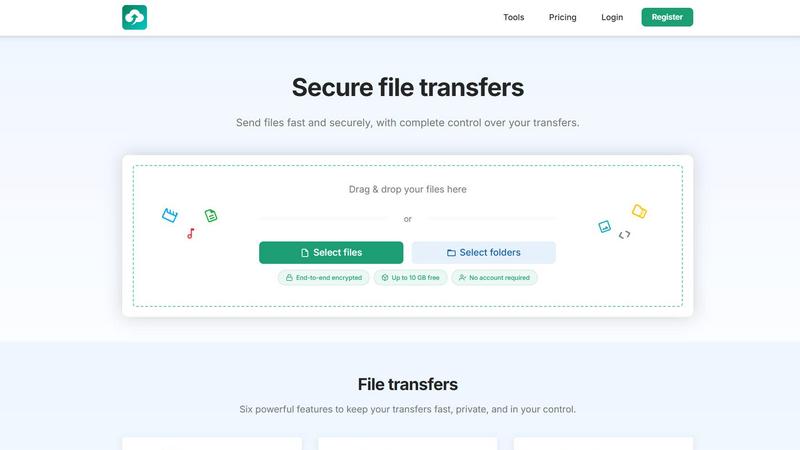
About HypeShare
HypeShare is a refreshingly straightforward and secure file transfer platform designed for speed, privacy, and genuine ease of use. In a world cluttered with bloated, feature-heavy sharing tools that often feel like they are working against you, HypeShare strips away the nonsense. Its core value proposition is simple: get your files from point A to point B as fast as possible, with end-to-end encryption and complete control over the transfer. You can send files up to 10GB without even creating an account, making it the ultimate tool for quick, one-off shares. For those who need a more permanent solution, signing up for a free account grants you 20GB of storage, encrypted transfers, custom expiry links, and the standout feature: file request pages that let others upload directly to you without needing an account on their end. This is a platform built for freelancers, agencies, and teams who are tired of the friction and data retention policies of traditional giants. HypeShare is opinionated in its focus on speed and privacy, and it shows in every aspect of the design. It is not just a tool; it is a philosophy that your data should be yours to control, share, and expire on your own terms. The interface is clean, the workflows are intuitive, and the commitment to a no-account-required guest mode is a genuine game-changer for professionals who value their time and their clients' privacy.
Features of HypeShare
Guest Transfers
This is my absolute favorite feature. You can send files up to 10GB to anyone without ever creating an account or handing over your email. This is perfect for those urgent, one-off deliveries where you just need the file to get there securely and disappear. It is the ultimate "no strings attached" file sharing experience, and it sets HypeShare apart from almost every competitor. You get full encryption, custom expiry, and download limits right out of the gate, even as a guest.
File Requests
HypeShare's file request feature is a masterstroke for professionals. You create a custom, shareable link (like hypeshare.io/request/yourname) and send it to clients or collaborators. They can upload files directly to your dashboard without needing to sign up for anything. This eliminates the back-and-forth of "can you send me that file?" and gives you a clean, organized collection point for everything from wedding photos to client assets. It is a productivity superpower.
End-to-End Encryption
Security is not an afterthought here; it is baked into the core of every transfer. HypeShare uses end-to-end encryption for all your files, meaning that even the platform itself cannot read your data. This is non-negotiable for anyone handling sensitive client work, legal documents, or personal information. You can combine this with an optional password on your transfer link for an extra layer of security, ensuring only the intended recipient can access your files.
Custom Expiry and Download Limits
You have total control over your transfer's lifespan. You can set an automatic expiration date for the link, ensuring it self-destructs after a specific time. Additionally, you can define exactly how many times the file can be downloaded. This is perfect for time-sensitive marketing assets, limited-availability media, or any scenario where you want to prevent your files from lingering online indefinitely. It is a simple but incredibly powerful way to manage your digital footprint.
Use Cases of HypeShare
Sending Large Creative Assets to Clients
As a graphic designer or video editor, you often need to deliver massive, high-resolution files to clients. HypeShare's 10GB guest transfer limit is perfect for this. You can quickly drag and drop a finished project, set a password for security, and email the link. The client gets a clean, fast download experience without needing to sign up for anything. This removes the friction from your delivery process and makes you look incredibly professional.
Collecting Files from Multiple Contributors
Imagine you are organizing a wedding and need all your guests to upload their photos. Or you are a project manager collecting final assets from a team of freelancers. The File Requests feature is your best friend. You create a single, branded request page, share the link in an email, and watch as files land directly in your HypeShare dashboard. No more clogged email inboxes or confusing shared folders. It is a centralized, organized, and stress-free way to collect files from anyone.
Secure Internal Team Sharing
For teams that handle sensitive data, HypeShare's Pro plan is a no-brainer. With unlimited transfers and 1TB of storage, you can securely distribute internal documents, financial reports, or proprietary software builds. The end-to-end encryption ensures that even if a link is intercepted, the data remains unreadable. You can also set download limits and expiry dates to ensure that confidential information is automatically cleaned up after a project is complete.
One-Time File Delivery for Freelancers
Freelancers often need to send a single, large file to a new client as part of an initial proposal or sample. The Guest mode is perfect here. You do not have to commit to a new account for a one-off transaction. You simply drag the file, set a 24-hour expiry, and send the link. It is fast, it is private, and it respects both your time and the client's privacy. This is the kind of frictionless experience that makes HypeShare a daily driver for independent professionals.
Frequently Asked Questions
Do I need an account to send a file?
No, you do not. HypeShare offers a generous Guest mode that allows you to send files up to 10GB without creating an account or providing any personal information. This is perfect for quick, one-time transfers. However, creating a free account unlocks features like 20GB of permanent storage, file requests, and transfer analytics.
How secure are my files on HypeShare?
Your files are protected with end-to-end encryption. This means your data is encrypted on your device before it is uploaded and can only be decrypted by the intended recipient. HypeShare itself cannot access the content of your files. You can also add an optional password to your transfer link for an additional layer of security.
What is a File Request and how do I use it?
A File Request is a custom, shareable page that allows anyone to upload files directly to your HypeShare account without needing to log in. You create a unique link (e.g., hypeshare.io/request/yourname) and share it with clients or collaborators. They simply drag and drop their files, and the data appears in your dashboard. It is perfect for collecting assets from multiple people.
What are the limits for the free plan?
The Free plan gives you 10 transfers per month, with up to 10 files per transfer. You get 20GB of total storage and can send files up to 10GB each. Transfers can be downloaded up to 100 times, and you get 5 email sends per month. Data is retained for 30 days. The Pro plan removes all of these limits for a small monthly fee.
Pricing of HypeShare
HypeShare offers a flexible pricing structure that starts at absolutely nothing. The Guest mode is completely free for occasional use, while the Free account is perfect for light users. For professionals, the Pro plan at 8.99 USD per month (billed yearly) is the sweet spot, offering unlimited transfers, 1TB of storage, and unlimited file retention. This is a fantastic value proposition compared to the bloated pricing of traditional cloud storage giants.
Similar to HypeShare

Screen Tester
Free online screen tester for checking dead pixels, colors, brightness, contrast, refresh rate, and display quality.

ProvenStartups
AI startup ideas with revenue receipts. 406 ideas, each graded by how trustworthy its revenue number is.

SimplestAPI
Make your Lovable app actually save data
LaunchChair
LaunchChair transforms your ideas into a working MVP by auto-generating specs and dynamic prompts, streamlining your AI product development.
Whop Trends
Whop Trends identifies trending products daily, enabling you to capitalize on market insights for increased income.
Blueberry
Blueberry is an all-in-one Mac app that integrates your editor, terminal, and browser for seamless web app development.
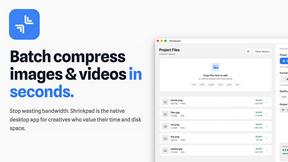
Shrinkpad
Effortlessly batch compress images and videos on Mac, saving time and space while enhancing quality with Shrinkpad.

Skene
Skene transforms your codebase into a powerful growth engine for seamless onboarding and user activation without.