
retroshelf
Retroshelf automatically logs every retro handheld session for you, building a personal timeline and connecting you with what real players are.
Visit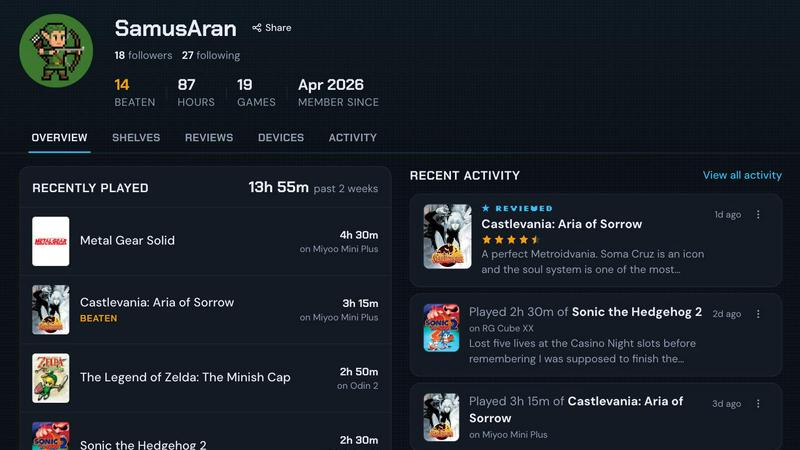
About retroshelf
retroshelf is not just another game tracking app. It is a purpose-built, opinionated platform for the retro handheld gaming community, designed by people who understand that the magic of a Miyoo Mini or an Anbernic RG35XX is not just in the hardware, but in the journey of playing through decades of classics. If you are the kind of player who has a dedicated shelf of handhelds, a stack of SD cards, and a running mental list of what you have beaten on the bus, retroshelf is for you. This tool solves the fundamental friction of logging your playtime across multiple devices without the tedious manual entry of spreadsheets or notes. Its core value proposition is radical simplicity: a tiny plugin lives on your handheld's SD card, automatically capturing every session. It logs the game title, the minutes you played, and which specific device you were using. This data populates a public "shelf" that shows your community exactly what you are currently playing, what you have finished, what you are reviewing, and what you are replaying. Instead of a lonely spreadsheet, you get a browsable, shareable timeline of your year in gaming. retroshelf turns scattered, forgotten sessions into a coherent narrative of your retro gaming life, and it connects you with a community of like-minded players who are also picking up, finishing, and replaying the games you love. It is a digital bookshelf for your physical hobby.
Features of retroshelf
Automatic Session Logging
Forget manual timers and note-taking. retroshelf uses a tiny, lightweight plugin that you drop directly onto your handheld's SD card. Once linked to your account, the plugin runs silently in the background. Every time you boot up a game, it captures the session: the exact game title, the precise minutes you played, and the specific handheld model (like your Miyoo Mini Plus or your Anbernic RG40XXV). Your shelf updates in near real-time, often while you are still on the couch. This is the closest thing to a "set it and forget it" solution for retro gaming logs.
Public Shelf with Device Context
Your profile is a living, public shelf that tells a story. It is not just a list of games; it is a contextual log. Visitors can see exactly what you are currently playing, what you have finished, what you are replaying, and any reviews you have left. The killer feature is device context. Instead of a generic star rating, your reviews show the handheld you played the game on. This is invaluable for the community, as performance, screen size, and ergonomics vary wildly between devices. A glowing review for a Game Boy game on a Miyoo Mini is a very different recommendation than one on a larger Odin device.
Browseable Year-in-Review Timeline
retroshelf turns your scattered gaming sessions across multiple handhelds into a beautiful, chronological timeline. You can browse back through the year to see exactly what you were playing in January versus August, and on which devices. This feature transforms your gaming history from a vague memory into a legible, searchable document. It is perfect for reflecting on your habits, discovering patterns in your play style, and sharing your journey with the community. It makes your year of play finally legible.
Community Discovery by Device
This is where retroshelf shines as a discovery tool. Instead of generic "popular games" lists, you can filter the community's shelves by specific hardware. Want to see what games are most popular on the Miyoo Mini this week? Filter by it. Curious what Anbernic owners are finishing on their RG35XX H? The data is right there. This feature provides real, actionable recommendations based on the exact hardware you own, helping you find games that play well on your specific device, not just games that are trending in general.
Use Cases of retroshelf
The Multi-Handheld Collector
You own a Miyoo Mini for on-the-go play, an Anbernic RG40XXV for the couch, and a Retroid Pocket for more powerful systems. Keeping track of what you played on which device is a nightmare. retroshelf solves this by logging every session from every device into one unified timeline. You can see your entire gaming history in one place, knowing exactly where you left off on which device, without any manual cross-referencing.
The Completionist Seeking Validation
You are the player who needs to see that "Finished" badge next to every game in your library. retroshelf gives you a public, visual representation of your completion journey. Your shelf shows exactly what you have beaten, and the community can see your dedication. This is not just for vanity; it is a powerful motivator. Seeing your finished pile grow, alongside the device context, gives you a concrete sense of accomplishment that a simple list cannot provide.
The Curator Looking for Device-Specific Recommendations
You just bought a new Anbernic RG35XX H and you are wondering what games play best on its 3.5-inch screen. Instead of scouring forums for vague advice, you can browse retroshelf's community shelves filtered by that exact device. You can see what other players are currently playing, finishing, and replaying on the same hardware. You get real-world, contextual recommendations from people who have actually played those games on your device.
The Community Reviewer
You have strong opinions about how a game feels on a specific handheld. retroshelf lets you leave star ratings and notes that are automatically tied to the device you played on. Your review is not just a number; it is a piece of advice for the community. When someone sees your 4-star review for a game on a Miyoo Mini, they know it comes with the context of that specific screen and control scheme, making your feedback far more valuable than a generic review.
Frequently Asked Questions
How does the automatic logging plugin work?
The plugin is a tiny, lightweight file you download from the retroshelf website and place onto your handheld's SD card. Once your device is linked to your retroshelf account via the plugin, it automatically detects when you launch a game. It records the game title, the duration of your play session, and the device model. This data is then synced to your shelf when your device is connected to Wi-Fi. It requires no manual input, no timers, and no post-session note-taking.
Which handheld operating systems are currently supported?
retroshelf currently supports muOS and OnionOS. These are two of the most popular custom firmware options for retro handhelds, powering devices from brands like Miyoo and Anbernic. The team is actively working on expanding support to other operating systems and stock firmware. If your device runs one of these OSes, you are ready to go. If not, you can join the waitlist for updates on future support.
Is my shelf public? Can I make it private?
Yes, by default your shelf is public. This is by design to foster the community discovery aspect of the platform. The whole point is to see what other players are picking up, finishing, and replaying on their specific devices. However, you have control over your profile. You can choose to hide specific sessions or games from public view if you wish, but the core experience is built around a shared, transparent community log.
What data does the plugin capture from my device?
The plugin is designed with privacy and minimalism in mind. It only captures three specific data points per session: the game title (as recognized by your OS), the total playtime in minutes, and the model of your handheld device. It does not access any other files, personal data, or system information. The data is used solely to populate your retroshelf timeline and community shelf. You can review and delete any session from your history at any time.
Explore more in this category:
Similar to retroshelf

Snapkin
Snapkin is a calorie tracker you use by photographing your plate.

AIdorable
Adopt a virtual baby who grows, learns, and remembers you.

Peekviewer
Anonymous Instagram viewer. Browse profiles, stories, and posts without an account or leaving a trace.
GeoRank
GeoRank is the only tool that ranks every place on earth by crypto CGT, letting you pin, compare, and ask AI about your relocation shortlist.
SLABCALC
SlabCalc is my favorite free suite of 34 concrete calculators and AI tools for instant volume, cost, and crack diagnosis on any project.
Cozy
Cozy is a private, local-only journal that keeps your words in plain files on your device, no servers, no AI.

NanoReads
NanoReads is my go-to for addictive stories and writing my own books with AI, a free marketplace across web, iOS, and Android.

PrettyScale
PrettyScale is my favorite free AI tool for private, instant face analysis and celebrity look-alikes right in your browser.